IndieGala Create Giveaway Helper

Creating a giveaway is now a lot easier!!

You will need to install an extension such as Tampermonkey, Greasemonkey or Violentmonkey to install this script.

You will need to install an extension such as Tampermonkey to install this script.

You will need to install an extension such as Tampermonkey or Violentmonkey to install this script.

You will need to install an extension such as Tampermonkey or Userscripts to install this script.

You will need to install an extension such as Tampermonkey to install this script.

You will need to install a user script manager extension to install this script.

(I already have a user script manager, let me install it!)

You will need to install an extension such as Stylus to install this style.

You will need to install an extension such as Stylus to install this style.

You will need to install an extension such as Stylus to install this style.

You will need to install a user style manager extension to install this style.

You will need to install a user style manager extension to install this style.

You will need to install a user style manager extension to install this style.

(I already have a user style manager, let me install it!)

Аўтар
MrMarble
Усталяванняў за дзень
0
Усяго ўсталяванняў
22
Рэйтынг
0 0 0
Версія
0.6
Створаны
03.09.2018
Абноўлены
04.09.2018
Памер
5.0 КБ
Ліцэнзія
MIT
Ужываецца на

IndieGala Create Giveaway Helper

Tampermonkey script that let the user create a IndieGala giveaway with less effort.

This script only applies to gift pages for now because is the only thing I had to try, maybe in the future it will be available to store purchases as well.

How to install

  1. You need to install Tampermonkey in Firefox or Chrome
  2. Go to the raw version of the script and it should prompt the installation window directly.

Usage

When you receive a gift on Indiegala, the url should look like this:

https://www.indiegala.com/gift?gift_id=a_bunch_of_random_characteres

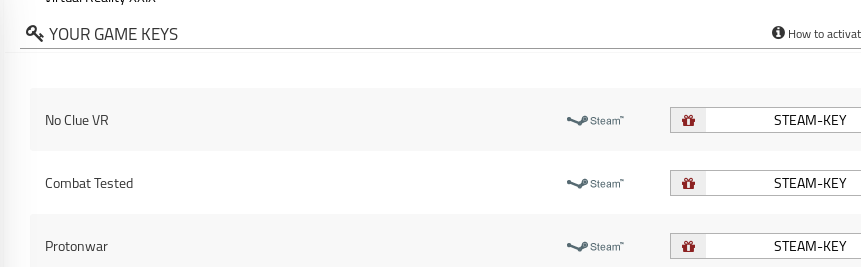
When you click the steam button, the game key will appear and next to it a red gift icon, when you click that icon a new window will pop-up (maybe you need to give permission first time) that new window will have all the information filled for the giveaway of that game, ready for you to press 'CREATE GIVEAWAY' button so you can still change things if you want.