Facebook last post scroller

Automatically scroll to the last viewed or marked Facebook story

За да инсталирате този скрипт, трябва да имате инсталирано разширение като Tampermonkey, Greasemonkey или Violentmonkey.

За да инсталирате този скрипт, трябва да инсталирате разширение, като например Tampermonkey .

За да инсталирате този скрипт, трябва да имате инсталирано разширение като Tampermonkey или Violentmonkey.

За да инсталирате този скрипт, трябва да имате инсталирано разширение като Tampermonkey или Userscripts.

За да инсталирате скрипта, трябва да инсталирате разширение като Tampermonkey.

За да инсталирате този скрипт, трябва да имате инсталиран скриптов мениджър.

(Вече имам скриптов мениджър, искам да го инсталирам!)

За да инсталирате този стил, трябва да инсталирате разширение като Stylus.

За да инсталирате този стил, трябва да инсталирате разширение като Stylus.

За да инсталирате този стил, трябва да инсталирате разширение като Stylus.

За да инсталирате този стил, трябва да имате инсталиран мениджър на потребителски стилове.

За да инсталирате този стил, трябва да имате инсталиран мениджър на потребителски стилове.

За да инсталирате този стил, трябва да имате инсталиран мениджър на потребителски стилове.

(Вече имам инсталиран мениджър на стиловете, искам да го инсталирам!)

Автор
soufianesakhi
Инсталации дневно
0
Инсталации общо
396
Рейтинг
4 0 0
Версия
1.3.1
Създаден
17.03.2016
Обновен
20.12.2017
Размер
10 КБ
Лиценз
MIT
Работи на

Facebook last post scroller

When this script is enabled, the following buttons will appear:
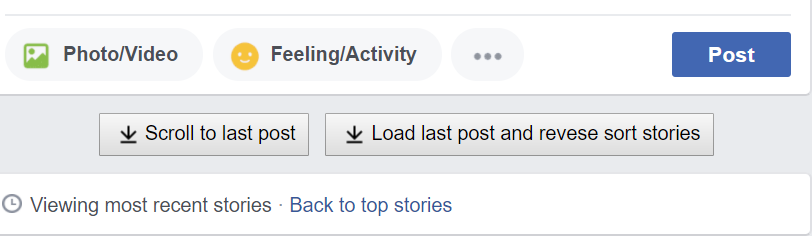
Menu

  • After clicking the 'Scroll to last post' button, the page will automatically scroll to the last viewed or marked story.
  • After clicking the 'Load last post and revese sort stories' the last story will be loaded and all the stories from the begining (newest story) until the last story will be sorted in reverse.

If the last viewed or marked story was removed in the mean time, the script will consider the story that has a timestamp older than the last stored story as the oldest.

A toolbar will be displayed to track the progress and to stop the loading & scrolling if it takes too long: loading-toolbar

The script only works when the homepage is set to view most recent stories instead of top stories.

By default, the last viewed story will be saved for the next session only after finding the current last story.

You can mark another story as the last story by clicking in the down arrow button near the timestamp area of a story:

mark-as-old-story

Installation

This script relies on the user scripts extensions like Greasemonkey or Tampermonkey.

After installing the appropriate user scripts extension, you can install the script from the following sites:

Firefox

The Greasemonkey extension should be installed.

Google Chrome

The Tampermonkey extension should be installed.