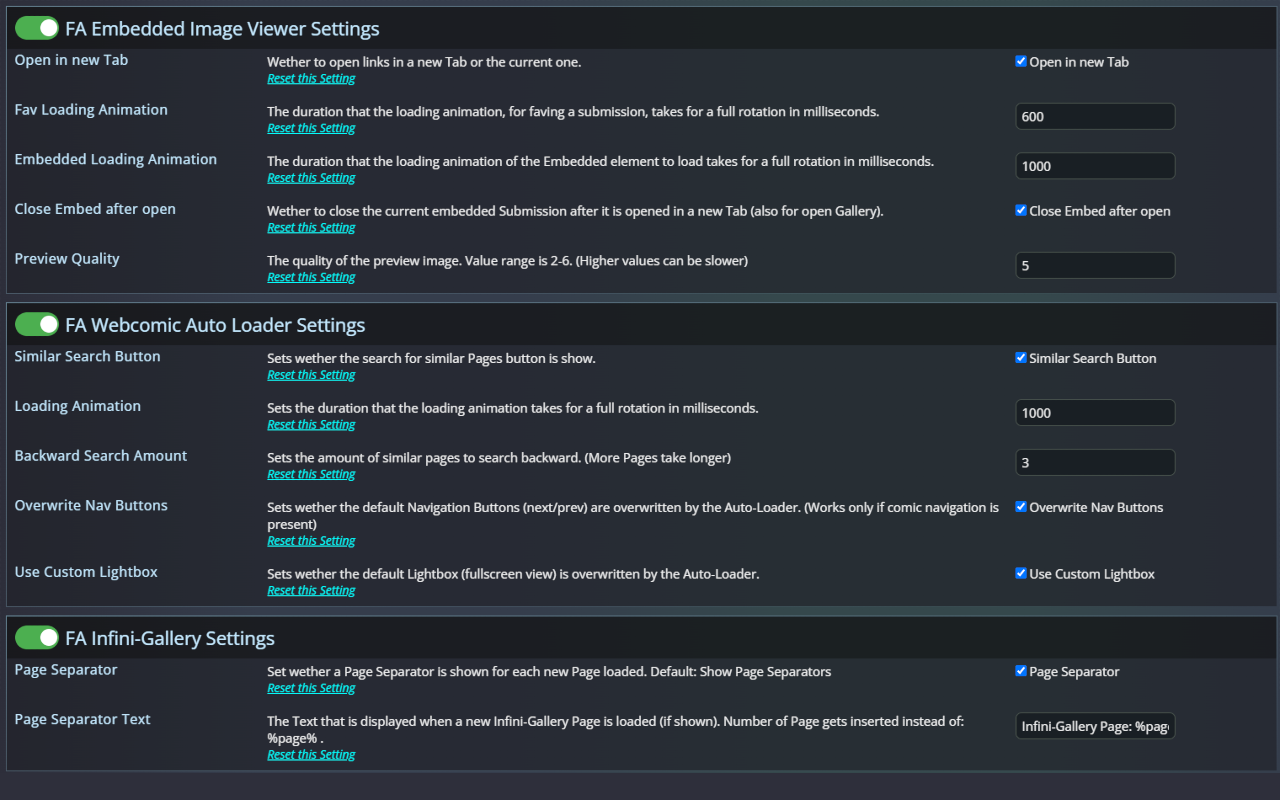
Furaffinity-Custom-Settings

Library to create Custom settings on Furaffinitiy

Този скрипт не може да бъде инсталиран директно. Това е библиотека за други скриптове и може да бъде използвана с мета-директива // @require https://update.greasyfork.org/scripts/475041/1617223/Furaffinity-Custom-Settings.js

За да инсталирате този скрипт, трябва да имате инсталирано разширение като Tampermonkey, Greasemonkey или Violentmonkey.

За да инсталирате този скрипт, трябва да инсталирате разширение, като например Tampermonkey .

За да инсталирате този скрипт, трябва да имате инсталирано разширение като Tampermonkey или Violentmonkey.

За да инсталирате този скрипт, трябва да имате инсталирано разширение като Tampermonkey или Userscripts.

За да инсталирате скрипта, трябва да инсталирате разширение като Tampermonkey.

За да инсталирате този скрипт, трябва да имате инсталиран скриптов мениджър.

(Вече имам скриптов мениджър, искам да го инсталирам!)

За да инсталирате този стил, трябва да инсталирате разширение като Stylus.

За да инсталирате този стил, трябва да инсталирате разширение като Stylus.

За да инсталирате този стил, трябва да инсталирате разширение като Stylus.

За да инсталирате този стил, трябва да имате инсталиран мениджър на потребителски стилове.

За да инсталирате този стил, трябва да имате инсталиран мениджър на потребителски стилове.

За да инсталирате този стил, трябва да имате инсталиран мениджър на потребителски стилове.

(Вече имам инсталиран мениджър на стиловете, искам да го инсталирам!)

Автор
Midori Dragon
Версия
4.3.0
Създаден
11.09.2023
Обновен
01.07.2025
Размер
60 КБ
Лиценз
MIT

Furaffinity Custom Settings

Helper Script to create Custom settings on Furaffinitiy. Also see docs on Furaffinity-Custom-Settings

How to use

  • @require this script
  • Create Settings Object:

    const customSettings = new FACustomSettings(); // Multiple Settings Pages can be created
    customSettings.provider = "Midori's Script Settings"; // Change Navigation Settings Name
    customSettings.headerName = "My Script Settings"; // Change the Settings Header Name
    

    See Settings for more info

  • Create a new Setting:

    const setting = CustomSettings.newSetting(SettingType, "Setting Name");
    setting.description = "Setting Description";
    setting.defaultValue = DefaultValue;
    setting.inInput = (target) => { doSomething(); }; // For Action Settings when clicked otherwise every time the Setting is changed
    setting.addEventListener("input", (target) => { doSomthing(); }); // Alternative to onInput
    setting.verifyRegex = /Regex/; // For Text Settings only
    

    See Settings for more info

  • Trigger when settings should be loaded:

    CustomSettings.loadSettingsMenu(); //loads Navigation Menu & Settings if on Settings Page
    

Feature Roadmap

Feature Status
Create new Settings and easily access Settings change ⠀⠀⠀⠀ ✅ Completed
Have different Setting Types ✅ Completed
⠀⠀⠀⠀Number (TextField that only allows Numbers) ✅ Completed
⠀⠀⠀⠀Boolean (Checkbox with a description) ✅ Completed
⠀⠀⠀⠀Action (Button with a description) ✅ Completed
⠀⠀⠀⠀Text (TextField that allow any Characters) ✅ Completed
⠀⠀⠀⠀Option (Combobox that allows multiple options) ✅ Completed
Change Settings Page Name and Header Name ✅ Completed
Have multiple different Setting Pages ✅ Completed
Import and Export Settings ✅ Completed

Documentation

Setting

The Setting class contains following Properties:

  • id - Can only be set once. Defines the Setting elements html id. Is set to setting Name, if not set manually.
  • name - Name of the Setting.
  • description - Description of the Setting.
  • type - Type of the Setting. (See SettingType for more info)
  • defaultValue - Default value for the Setting. (Is ignored on SettingTypes.Action)
  • action - Action that is executed when the Setting changes. (See Action for more info)
  • value - Current value of the Setting.

  • min - Minimum value for SettingType.Number
  • max - Maximum value for SettingType.Number
  • step - Step value for SettingType.Number

  • verifyRegex - Regex for validation of input for SettingType.Text

SettingType

SettingType can have the following values:

  • SettingType.Number - A TextField that only accepts Numbers. (Enables min, max, step)
  • SettingType.Text - A TextField that allows any Character. (Enables verifyRegex)
  • SettingType.Boolean - A Checkbox with a description.
  • SettingType.Action - A Button with a certain Action. (Value returns the name)
  • SettingType.Option - A Combobox with multiple Options

Input

The onInput Property defines a Function that is executed when the Setting changed. It receives the Settings Element as a Parameter. It can also be used with addEventListener. Example:

customSetting.onInput = (target) => {
  console.log(target.value); // Target is the HTML Element of the Setting
};
customSetting.addEventListener("input", (target) => {
  console.log(target.value);
});

Here every time the Checkbox is clicked the program prints out wether it is checked or not.