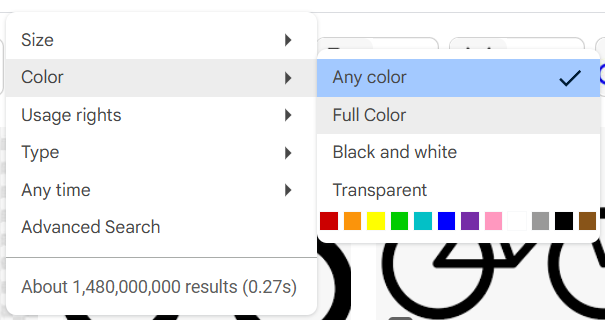
This brings back the option to filter for full color images, excluding black and white ones.
Once upon a time, ages ago, before idiot decision makers messed everything up, we used to be able to filter Google images by 'Full Color'.
What does 'Full Color' mean?
Full Color images are images of any color and every color, EXCLUDING black and white images. So you can expect to see a wide variety of different color images, but not any black and white ones.
For some idiotic reason, Google replaced 'Full Color' with 'Any Color'. Or maybe we had both back then, but they removed 'Full Color'. I can't remember.
'Any Color' is impossible for me to use. It shows me like 85% or more black and white images when I want colored ones. Of course, I can search by a specific color by clicking that specific color option. But I don't want to search by just one color. I want to see all the different colors at once that are not black and white.
And the sad thing is that the ability to search for 'Full Color' was never completely removed. It was just hidden and buried to the point where it was impossible to find or too inconvenient to get to.
So many years ago, before I even knew that AI existed, I created a userscript that brought back the 'Full Color' search filter option. Which is impressive since I pretty much know nothing about coding. I just do trial and error until something works. But it was easy to make that userscript back then because Google was using aria labels. So all I had to do was select an element by its aria label, clone it, modify a portion of the href, rename the link to something else, and ta da. It was only a few lines of code.
But since then, Google has removed the aria labels, so I had to use a more complicated approach. At first, I used Copilot to make a new userscript. But then five days later, I used Gemini 2.5 Pro to make a much superior version. It is now a solid and full-proof, working userscript.
Before: 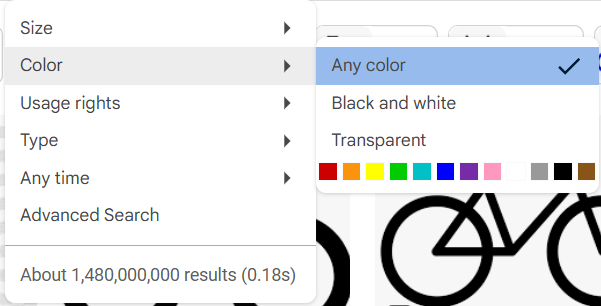
After: