Google Bildersuche - Bildabmessungen anzeigen

Zeigt die Bildabmessungen (z. B. "1920 × 1080") für jedes Vorschaubild auf der Ergebnisseite der Google-Bildsuche an.

Du musst eine Erweiterung wie Tampermonkey, Greasemonkey oder Violentmonkey installieren, um dieses Skript zu installieren.

You will need to install an extension such as Tampermonkey to install this script.

You will need to install an extension such as Tampermonkey or Violentmonkey to install this script.

You will need to install an extension such as Tampermonkey or Userscripts to install this script.

You will need to install an extension such as Tampermonkey to install this script.

Sie müssten eine Skript Manager Erweiterung installieren damit sie dieses Skript installieren können

(Ich habe schon ein Skript Manager, Lass mich es installieren!)

You will need to install an extension such as Stylus to install this style.

You will need to install an extension such as Stylus to install this style.

You will need to install an extension such as Stylus to install this style.

You will need to install a user style manager extension to install this style.

You will need to install a user style manager extension to install this style.

You will need to install a user style manager extension to install this style.

(I already have a user style manager, let me install it!)

Autor
Tad Wohlrapp
Installationen heute
2
Installationen gesamt
10.947
Bewertungen
56 2 6
Version
1.5.0
Erstellt am
19.04.2020
Letzte Aktualisierung
16.12.2025
Größe
9,7 KB
Kompatibilität
Kompatibel mit Firefox Kompatibel mit Chrome Kompatibel mit Opera Kompatibel mit Edge
Lizenz
MIT
Wird angewandt auf

Icon

Google Image Search - Show Image Dimensions

This userscript reintroduces image dimensions on thumbnails on the Google Image Search results page.
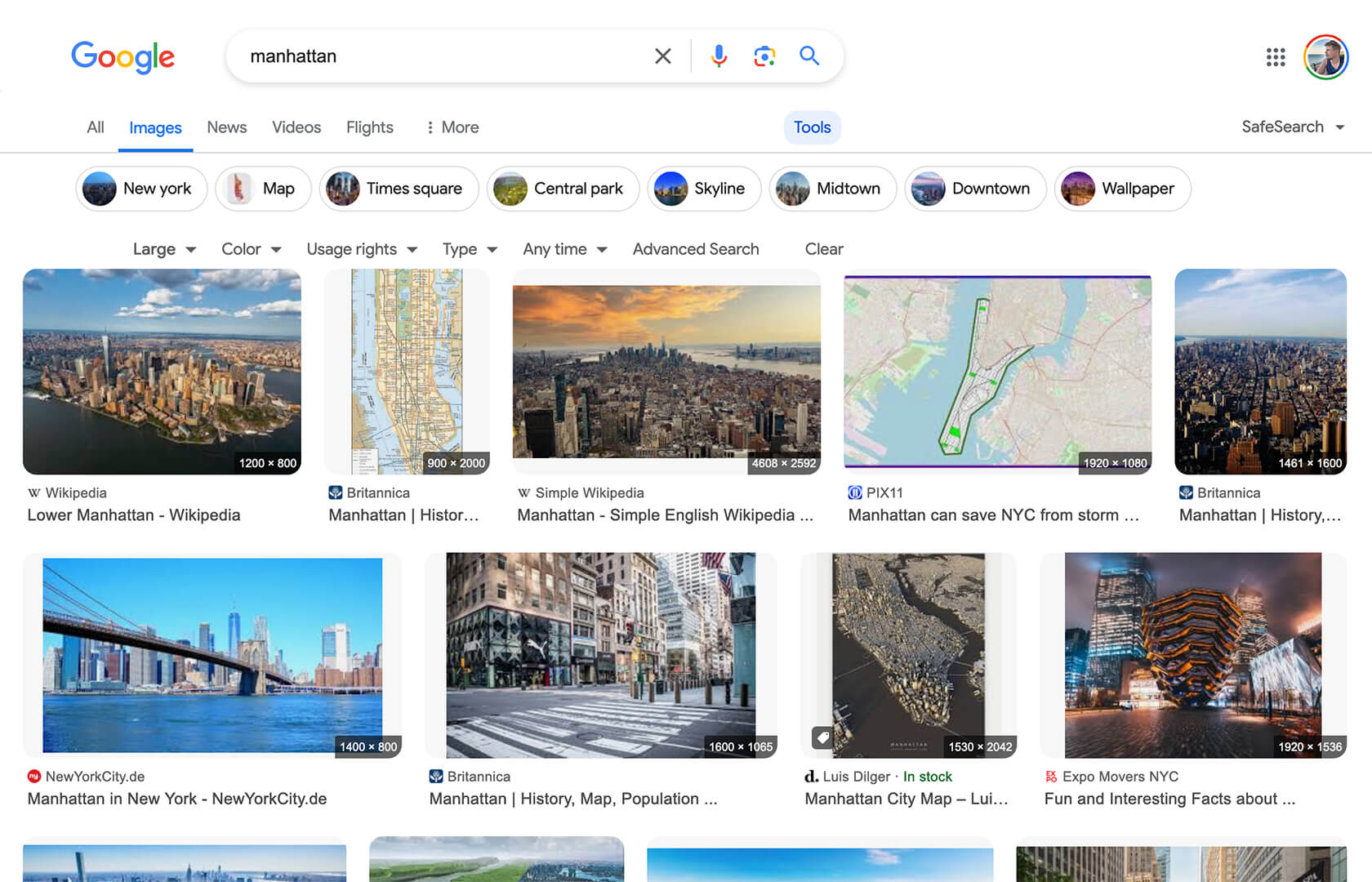
Screenshot

Screenshot

Installation

To use userscripts you need to first install a userscript manager. They come as extensions for various browsers:

After you have installed a userscript manager, head over to greasyfork.org/scripts/401432 and click on the green "Install this script" button there.

Usage

After you have installed a userscript manager and this script, just visit the Google Image Search page (https://www.google.com/imghp) and start searching 😃