Facebook cleaner

This script hides sponsored posts (ads) on Facebook, making your feed cleaner and free from distractions.

θα χρειαστεί να εγκαταστήσετε μια επέκταση όπως το Tampermonkey, το Greasemonkey ή το Violentmonkey για να εγκαταστήσετε αυτόν τον κώδικα.

You will need to install an extension such as Tampermonkey to install this script.

θα χρειαστεί να εγκαταστήσετε μια επέκταση όπως το Tampermonkey ή το Violentmonkey για να εγκαταστήσετε αυτόν τον κώδικα.

θα χρειαστεί να εγκαταστήσετε μια επέκταση όπως το Tampermonkey ή το Userscripts για να εγκαταστήσετε αυτόν τον κώδικα.

You will need to install an extension such as Tampermonkey to install this script.

Θα χρειαστεί να εγκαταστήσετε μια επέκταση διαχείρισης κώδικα χρήστη για να εγκαταστήσετε αυτόν τον κώδικα.

(Έχω ήδη έναν διαχειριστή κώδικα χρήστη, επιτρέψτε μου να τον εγκαταστήσω!)

You will need to install an extension such as Stylus to install this style.

You will need to install an extension such as Stylus to install this style.

You will need to install an extension such as Stylus to install this style.

You will need to install a user style manager extension to install this style.

You will need to install a user style manager extension to install this style.

You will need to install a user style manager extension to install this style.

(Έχω ήδη έναν διαχειριστή στυλ χρήστη, επιτρέψτε μου να τον εγκαταστήσω!)

Δημιουργός
Łukasz Micał
Ημερήσιες εγκαταστάσεις
0
Σύνολο εγκαταστάσεων
152
Βαθμολογίες
3 0 2
Έκδοση
0.2.1
Δημιουργήθηκε την
24/12/2024
Ενημερώθηκε την
30/12/2024
Μέγεθος
20 KB
Άδεια
Μη διαθέσιμη
Εφαρμόζεται σε

Facebook Cleaner

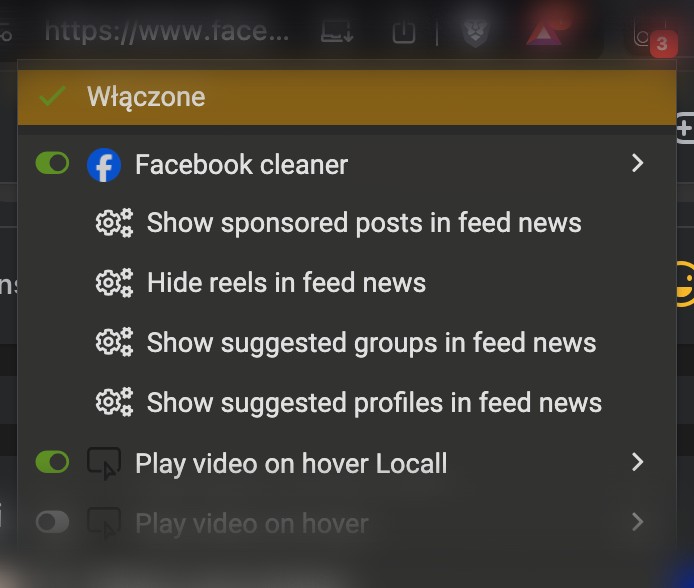
This script helps you take control of your Facebook experience by hiding unnecessary and distracting elements such as sponsored posts, suggested groups, suggested profiles, and reels. With this tool, you can customize your feed to show only the content you want to see.
Features

  • Automatically identifies and hides:
    • Sponsored posts.
    • Suggested profiles.
    • Suggested groups.
    • Reels.
  • All elements can be toggled on or off in the settings.

Settings Screenshot


Installation Instructions

To use this script, follow these steps:

Prerequisites

Installation Steps

  1. Install Tampermonkey or Greasemonkey:
  1. Install the script via one of the following links:
  1. After installation, refresh your Facebook feed to see the script in action.

Example Screenshot


Troubleshooting

  • Ensure your Tampermonkey or Greasemonkey extension is enabled.
  • Check that the script is active in the extension dashboard.
  • If you encounter any issues, please report them on the GitHub Issues page.

Contributing

Contributions are welcome! Feel free to fork the repository and submit pull requests.


License

This project is licensed under the MIT License. See the LICENSE file for details.