AutoMudae

Automates the use of Mudae bot in Discord

Tendrás que instalar una extensión para tu navegador como Tampermonkey, Greasemonkey o Violentmonkey si quieres utilizar este script.

You will need to install an extension such as Tampermonkey to install this script.

Tendrás que instalar una extensión como Tampermonkey o Violentmonkey para instalar este script.

Necesitarás instalar una extensión como Tampermonkey o Userscripts para instalar este script.

Tendrás que instalar una extensión como Tampermonkey antes de poder instalar este script.

Necesitarás instalar una extensión para administrar scripts de usuario si quieres instalar este script.

(Ya tengo un administrador de scripts de usuario, déjame instalarlo)

Tendrás que instalar una extensión como Stylus antes de poder instalar este script.

Tendrás que instalar una extensión como Stylus antes de poder instalar este script.

Tendrás que instalar una extensión como Stylus antes de poder instalar este script.

Para poder instalar esto tendrás que instalar primero una extensión de estilos de usuario.

Para poder instalar esto tendrás que instalar primero una extensión de estilos de usuario.

Para poder instalar esto tendrás que instalar primero una extensión de estilos de usuario.

(Ya tengo un administrador de estilos de usuario, déjame instalarlo)

Autor
Nxve
Instalaciones diarias
1
Instalaciones totales
1,272
Calificaciones
2 3 1
Versión
0.8.5
Creado
08/10/2022
Actualizado
19/10/2022
Tamaño
82.2 KB
Licencia
GNU GPLv3
Funciona en

⚠ Discontinued: refer to AutoMudae Extension.

AutoMudae 👾

Userscript for Tampermonkey that automates the use of Mudae bot in Discord.
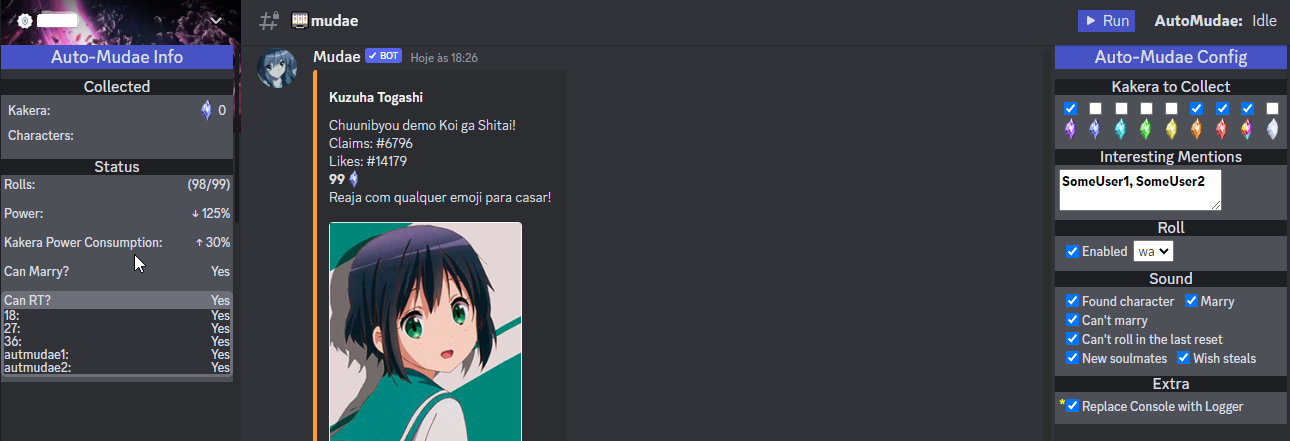
Image Preview

⚠ Disclaimer

As it is in early development and it's initial purpose is personal use, it has some limitations for now: Chrome Browser, ptBR Mudae, slash commands only and such.

Feel free to report any issue or ask for features.

Features

  • [x] Roll
    • [x] Select roll type
    • [ ] Opt between slash and typed
  • [x] React to Kakera
    • [x] Filter by kakera type
    • [ ] Filter by character key level
  • [x] Claim characters
    • [x] Wished by me
    • [x] Wished by other
    • [ ] Not wished
  • [x] Beep sounds for some events
  • [x] Multi Client
    • [x] Use all logged accounts (Discord supports up to 4 accounts)
    • [x] Use Token List (Hard cap at 20 for now)
  • [ ] Auto-use $us / $rolls when needed
  • [ ] Auto-use $rt when needed

🛠 Installation

  1. Install Tampermonkey.
  2. Go to GreasyFork Script Page and install it from there.

Usage

Open Discord web, navigate to desired channel and refresh the page so Tampermonkey can inject the userscript at the tab.

Now you have two options at upper center of your Discord page:

  • Use Logged Users: which uses all your Discord logged users (Up to 4)
  • Use Token List: which will ask for a list of Discord tokens (Up to 20 for now)

You have now a Run button at upper right.

TODO & Known Issues

  • Add other language support
  • Add config to delay claim (In case of $togglesnipe)
  • Adapt to $togglebutton
  • Add to total claimed kakera those received from EMERALD IV reward
  • Add a way to list interesting characters/series to claim
  • Improve it's performance while running on background (Chrome issue with "inactive" tabs)