YouTube Playback Plox

Guarda y retoma automáticamente el progreso de vídeos en YouTube sin necesidad de iniciar sesión.

Tendrás que instalar una extensión para tu navegador como Tampermonkey, Greasemonkey o Violentmonkey si quieres utilizar este script.

You will need to install an extension such as Tampermonkey to install this script.

Tendrás que instalar una extensión como Tampermonkey o Violentmonkey para instalar este script.

Necesitarás instalar una extensión como Tampermonkey o Userscripts para instalar este script.

Tendrás que instalar una extensión como Tampermonkey antes de poder instalar este script.

Necesitarás instalar una extensión para administrar scripts de usuario si quieres instalar este script.

(Ya tengo un administrador de scripts de usuario, déjame instalarlo)

Tendrás que instalar una extensión como Stylus antes de poder instalar este script.

Tendrás que instalar una extensión como Stylus antes de poder instalar este script.

Tendrás que instalar una extensión como Stylus antes de poder instalar este script.

Para poder instalar esto tendrás que instalar primero una extensión de estilos de usuario.

Para poder instalar esto tendrás que instalar primero una extensión de estilos de usuario.

Para poder instalar esto tendrás que instalar primero una extensión de estilos de usuario.

(Ya tengo un administrador de estilos de usuario, déjame instalarlo)

Autor
Alplox
Instalaciones diarias
2
Instalaciones totales
365
Calificaciones
7 0 0
Versión
0.0.10-1
Creado
22/10/2025
Actualizado
18/05/2026
Tamaño
881 KB
Licencia
MIT
Funciona en

README en Español

YouTube Playback Plox Logo

YouTube Playback Plox

Saves and automatically resumes the playback progress of videos on YouTube without needing to log in.

GreasyFork Version License

Why YPP?Quick StartFeaturesScreenshotsTranslationsLicense

Why YouTube Playback Plox?

YouTube Playback Plox is a userscript that automatically remembers the exact point where you left off in a YouTube video, so you can resume it later without needing an account or logging in.

  • Absolute Privacy - For those who don't want to depend on YouTube's history. No Google account required.
  • Persistent Memory - For those who use browsers with blockers or without persistent history.
    • ⚠️ Warning: Clearing "Cookies and site data" in your browser will permanently delete all saved video progress. Always export your data first when using this option!
  • Cloud Sync Capabilities - Sync between devices through GitHub using Private Repositories or Secret Gists.

Quick Start

Requirements: You need a script manager extension installed in your browser.

1- Install a Script Manager

2- Install the Script

📥 Click here to install or download it directly from GreasyFork.

After installation, your videos will start tracking correctly. Access the saved videos modal directly within the YouTube progress bar.


Features

  • 🔐 100% Private and Local: Works without a Google account; everything is stored locally using IndexedDB in your browser.
  • 🕒 Smart Auto-Save: Automatically saves the time and resumes from that point when you return, thanks to context-isolated detectors. Enable tracking individually in the settings for:
    • Regular Videos
    • Miniplayer
    • Shorts (disabled by default)
    • Live streams (disabled by default)
    • Previews on home (disabled by default)
  • 🔖 Manual Save Option: Save the current playback time by pressing a button whenever you want.
  • 🛑 Anti-Ads: Prevents the saving of times and false plays during ads. (The script does not block ads. Use uBlock Origin to block ads).
  • Fast Performance: Uses "Virtual Scrolling" in the saved videos modal to instantly handle lists of thousands of videos without consuming additional memory.
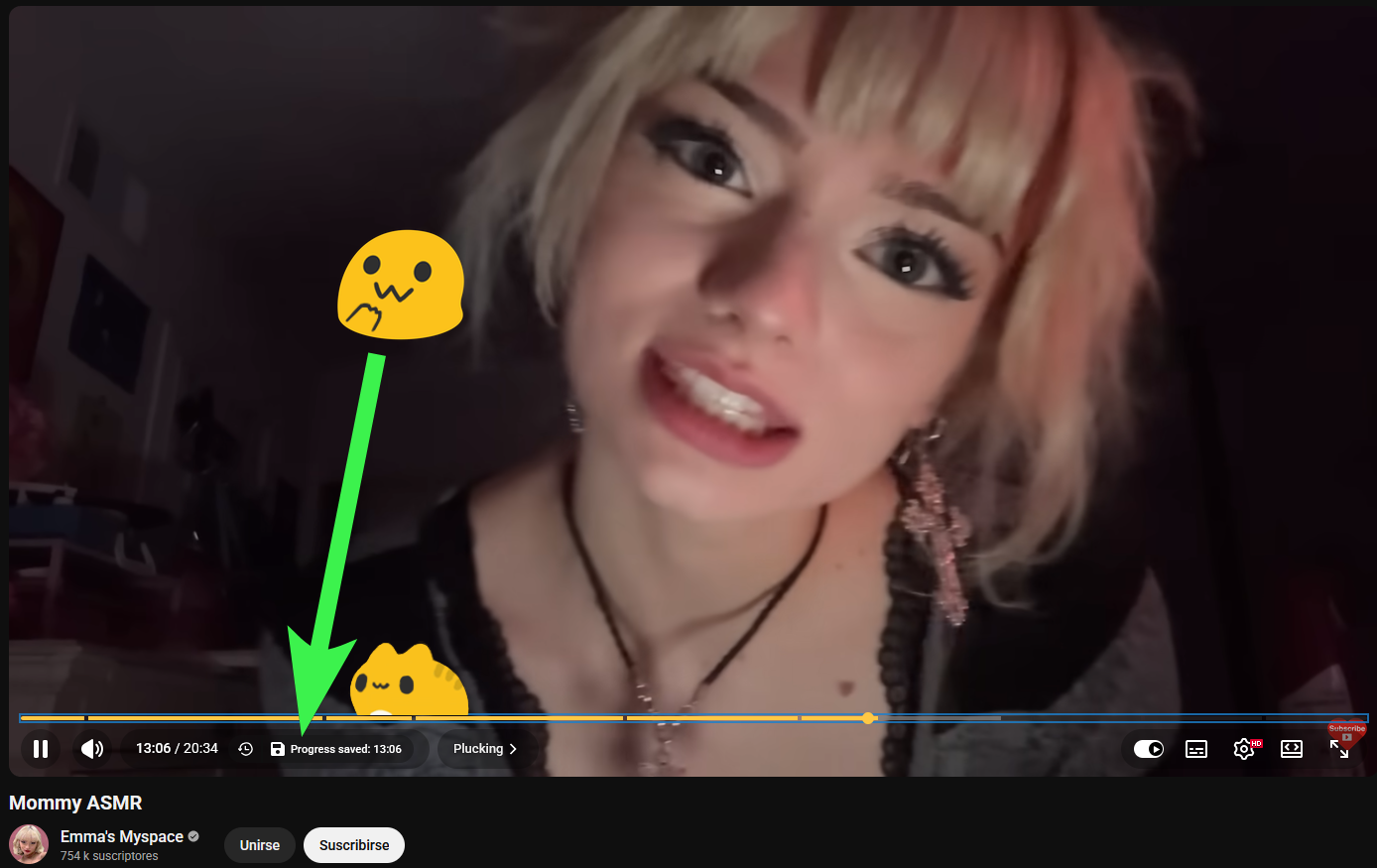
  • 🔔 UI Notifications: Native and discreet messages in the player bar that show when a video is being resumed or saved.
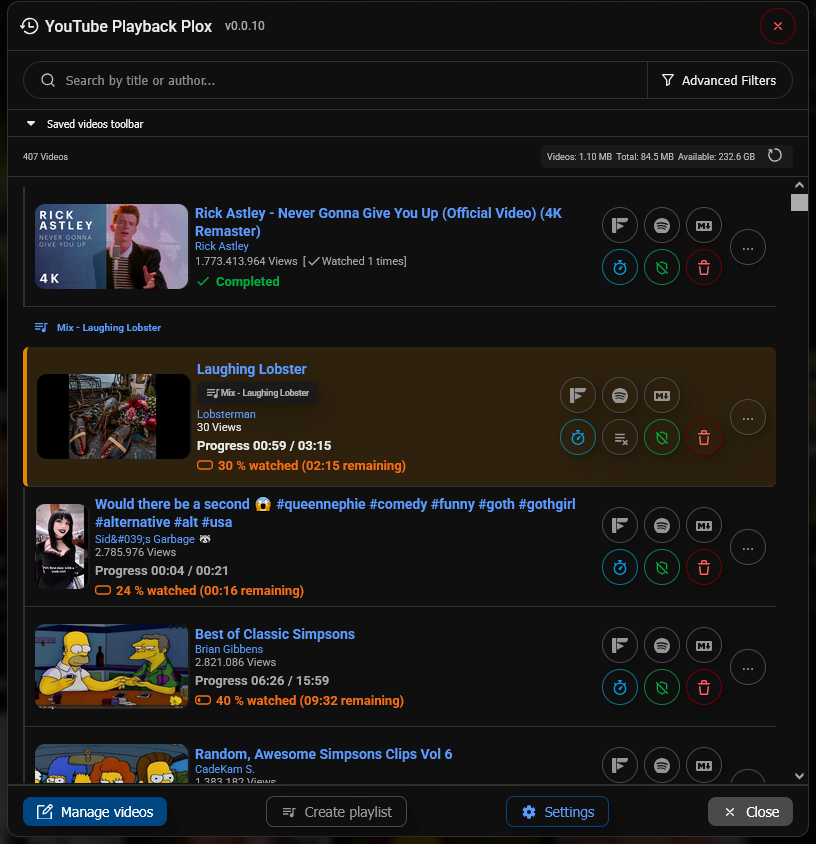
  • Advanced Video Manager: Complete modal with playlists, preloaded thumbnails, authors, percentages viewed, and remaining time.
    • ⏱ Set a "fixed start time" per video to always start from a predictable point (ideal for skipping intros).
    • 📦 Export/Import your backup to JSON or SQLite databases (100% compatible with FreeTube).
    • 🔍 Advanced Filters: Filter videos by: title, author, type, duration, date, percentage viewed, remaining time, and more.
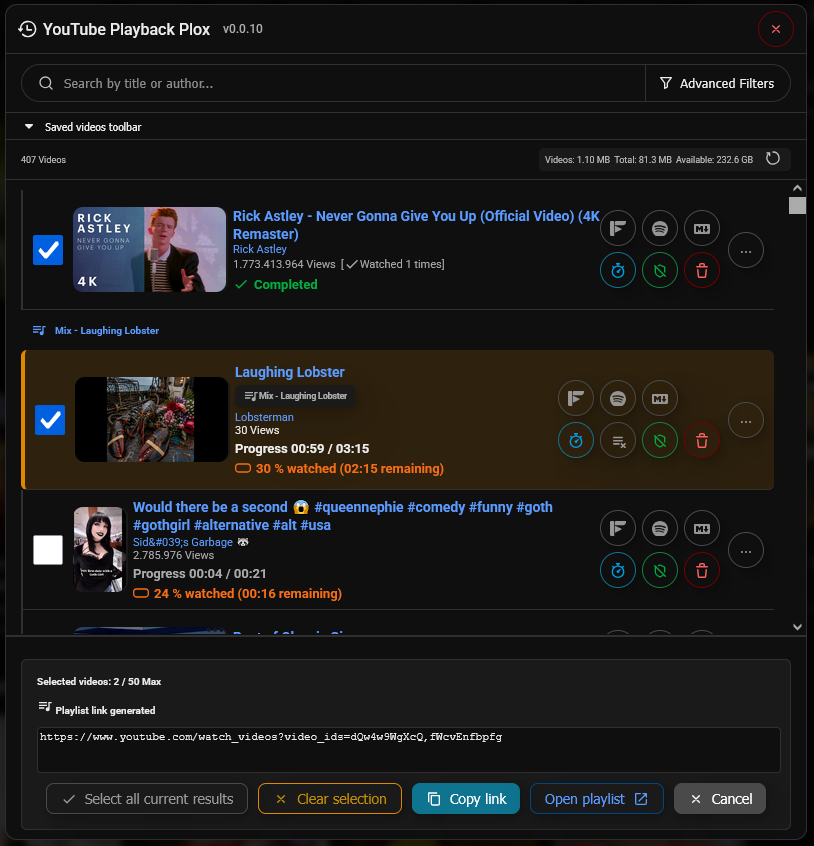
    • 🔀 Create public YouTube playlists on the fly from your viewed videos.
    • 🔗 Unlink videos from arbitrary playlists in just 1 click.
    • 🛡 Set a "protected" state to prevent videos from being accidentally deleted.
  • ☁️ Cloud Sync Option: Sync your saved videos with your GitHub account, either through Gist (Secret) or Repository (Private). (Can be enabled in the configuration, disabled by default)

Screenshots

Example of alert time saved


Example of modal to view saved videos


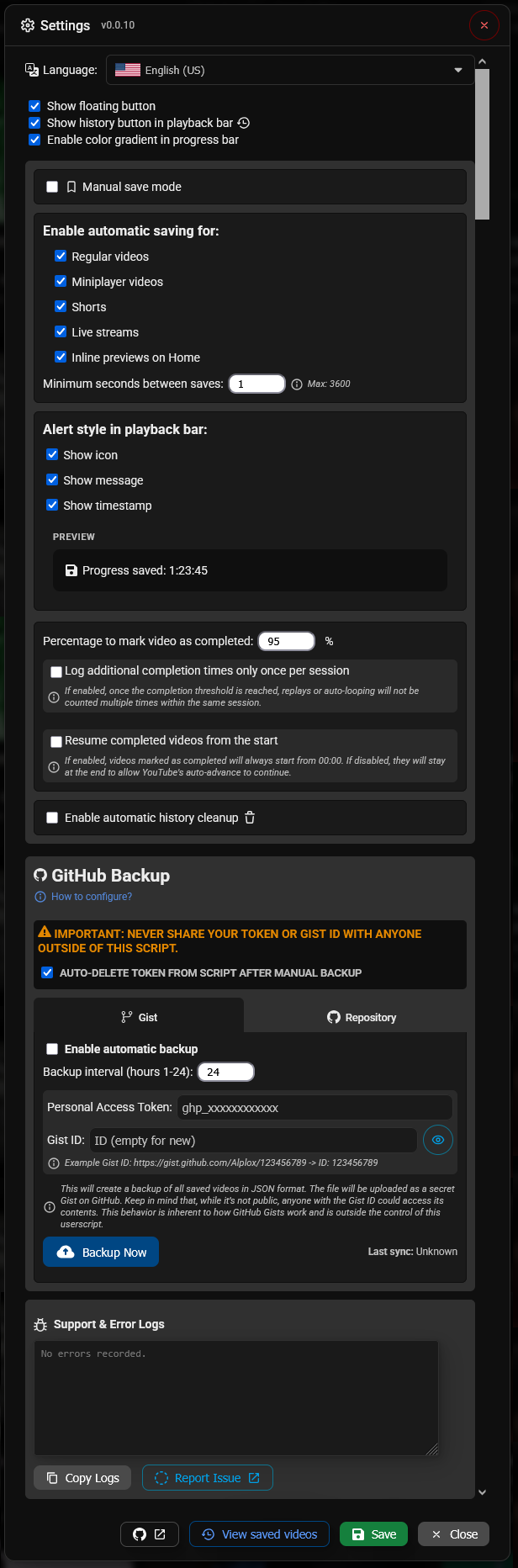
Example of configuration modal


Example of playlist creation

Global Translations

Settings and UI are fully translated into 50+ native languages.

Do you want to help, collaborate or correct the translation of the script? You can do it from here.

Language Code Language Code
🇬🇧 English (UK) en-GB 🇺🇸 English (US) en-US
🇪🇸 Español es-ES 🇪🇸 Español (Latam) es-419
🇪🇸 Català ca 🇫🇷 Français fr
🇩🇪 Deutsch de 🇮🇹 Italiano it
🇵🇹 Português pt 🇳🇱 Nederlands nl
🇵🇱 Polski pl 🇸🇪 Svenska sv
🇩🇰 Dansk da 🇳🇴 Norsk no
🇫🇮 Suomi fi 🇨🇿 Čeština cs
🇸🇰 Slovenčina sk 🇭🇺 Magyar hu
🇷🇴 Română ro 🇧🇬 Български bg
🇬🇷 Ελληνικά el 🇷🇸 Српски sr
🇭🇷 Hrvatski hr 🇸🇮 Slovenščina sl
🇱🇹 Lietuvių lt 🇱🇻 Latviešu lv
🇺🇦 Українська uk 🇷🇺 Русский ru
🇹🇷 Türkçe tr 🇸🇦 العربية ar
🇮🇷 فارسی fa 🇮🇱 עברית he
🇮🇳 हिन्दी hi 🇧🇩 বাংলা bn
🇮🇳 తెలుగు te 🇱🇰 தமிழ் ta
🇮🇳 मराठी mr 🇨🇳 简体中文 zh
🇹🇼 繁體中文 zh-TW 🇭🇰 粵語 yue
🇭🇰 繁體中文 (HK) zh-HK 🇯🇵 日本語 ja
🇰🇷 한국어 ko 🇹🇭 ไทย th
🇻🇳 Tiếng Việt vi 🇮🇩 Indonesia id
🇲🇾 Melayu ms 🇵🇭 Filipino tl
🇲🇲 မြန်မာ my 🇰🇪 Kiswahili sw

License

This project is licensed under the MIT License - see the LICENSE file for details.

Acknowledgments

Notice: This project is not affiliated with Google or YouTube.

Built with ❤️ by Alplox