YouTube-UI-Customizer

Enhances your YouTube experience. Customize the video grid layout by adjusting thumbnails per row, hide Shorts content, and automatically redirect the Shorts player to the standard video player.

Tendrás que instalar una extensión para tu navegador como Tampermonkey, Greasemonkey o Violentmonkey si quieres utilizar este script.

You will need to install an extension such as Tampermonkey to install this script.

Necesitarás instalar una extensión como Tampermonkey o Violentmonkey para instalar este script.

Necesitarás instalar una extensión como Tampermonkey o Userscripts para instalar este script.

Necesitará instalar una extensión como Tampermonkey para instalar este script.

Necesitarás instalar una extensión para administrar scripts de usuario si quieres instalar este script.

(Ya tengo un administrador de scripts de usuario, déjame instalarlo)

Necesitará instalar una extensión como Stylus para instalar este estilo.

Necesitará instalar una extensión como Stylus para instalar este estilo.

Necesitará instalar una extensión como Stylus para instalar este estilo.

Necesitará instalar una extensión del gestor de estilos de usuario para instalar este estilo.

Necesitará instalar una extensión del gestor de estilos de usuario para instalar este estilo.

Necesitará instalar una extensión del gestor de estilos de usuario para instalar este estilo.

(Ya tengo un administrador de estilos de usuario, déjame instalarlo)

Autor
p65536
Instalaciones diarias
1
Instalaciones totales
48
Calificaciones
0 0 0
Versión
1.3.0
Creado
21/8/2025
Actualizado
7/12/2025
Tamaño
56,8 KB
Licencia
MIT
Funciona en

Overview

Note: This script is designed specifically for the desktop YouTube site (www.youtube.com) and does not support the mobile version (m.youtube.com).

This script provides several enhancements to the YouTube user interface, giving you more control over your viewing experience. You can customize the video grid layout, hide all Shorts-related content, and automatically redirect the Shorts player to the standard video player.


📢 Important Update (v1.3.0 - 2025/12/07)

The on-screen settings button has been removed to keep the interface clean.
You can now access the settings panel directly from your userscript manager's menu (e.g., Tampermonkey menu). Please refer to the Getting Started section below for details.


Features

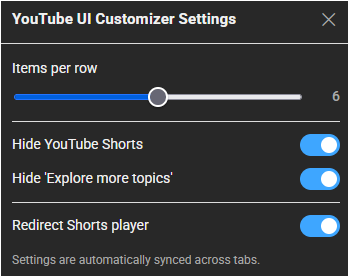
  • Customizable Grid Layout: Set the number of video thumbnails displayed per row (from 2 to 10) using a simple slider in the settings menu.
  • Comprehensive Shorts Blocker: Completely removes all Shorts content from your view, including shelves on the homepage, videos in feeds and search results, and links in the sidebar.
  • Shorts Player Redirect: Automatically redirects the vertical Shorts player to the standard, familiar video player interface for a consistent viewing experience.
  • Cross-Tab Syncing: Settings are automatically synced across all your open YouTube tabs, ensuring a seamless experience without manual updates.

Getting Started

Access the settings via your userscript manager's menu:
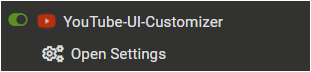
  1. Open the Tampermonkey (or equivalent) menu in your browser.
  2. Select YouTube UI Customizer Settings.
  3. Configure your preferences in the modal window.

Settings Menu

Settings Panel


Tested Environment

  • This script is primarily developed and tested on Firefox with Tampermonkey.
  • It is also confirmed to work on Chromium-based browsers, but testing on these platforms is less extensive.

This script is open-source and licensed under the MIT License.