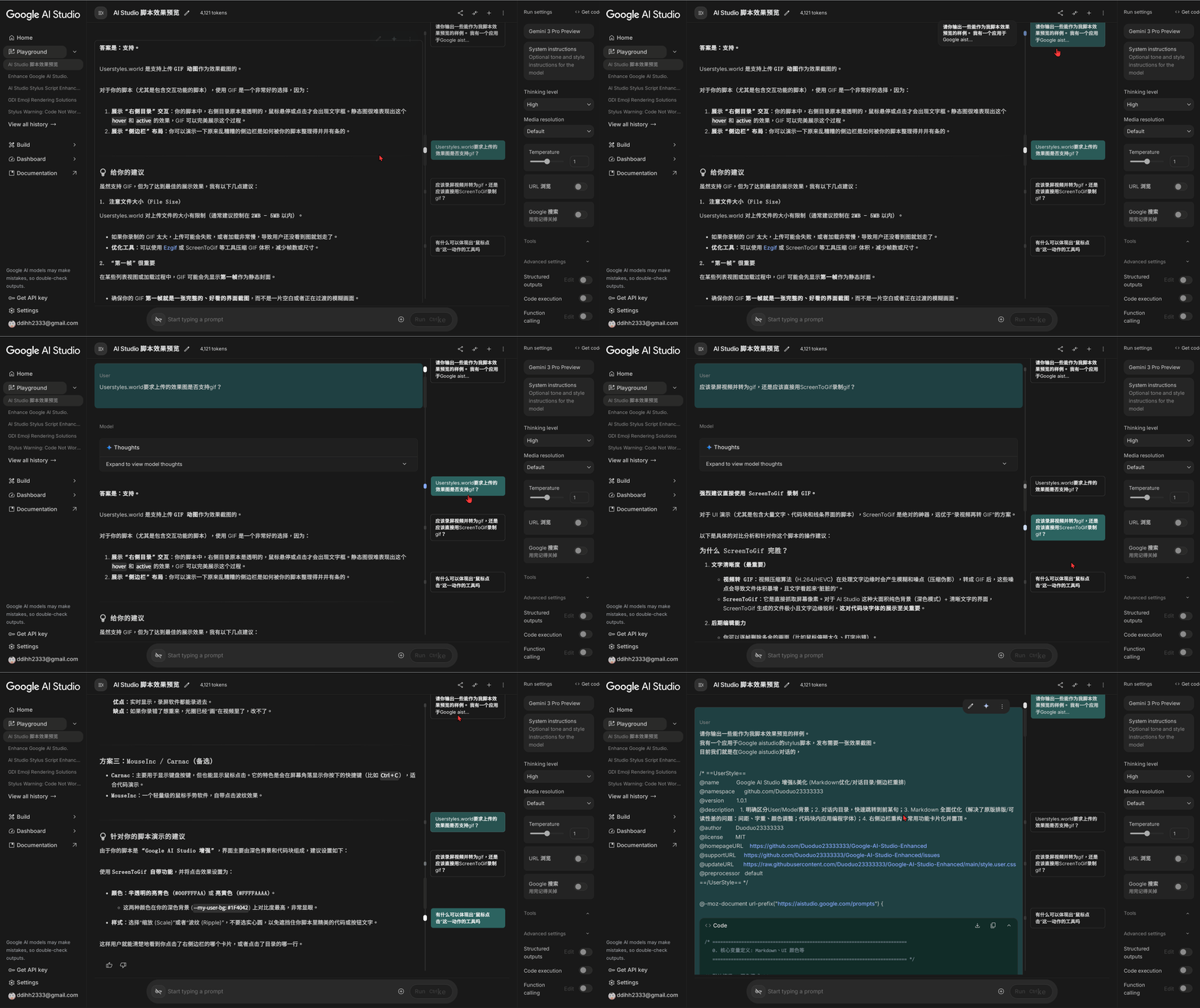
Google AI Studio 增强&美化 (Markdown优化/对话目录/侧边栏重排)

1. 明确区分User/Model背景;2. 对话内目录,快速跳转到前某句;3. Markdown 全面优化(解决了原版排版/可读性差的问题:间距、字重、颜色调整;代码块内应用编程字体);4. 右侧边栏重构,常用功能卡片化并置顶;5. 输入框空置时默认只占单行,节省空间。

You will need to install an extension such as Tampermonkey, Greasemonkey or Violentmonkey to install this script.

You will need to install an extension such as Tampermonkey to install this script.

You will need to install an extension such as Tampermonkey or Violentmonkey to install this script.

You will need to install an extension such as Tampermonkey or Userscripts to install this script.

You will need to install an extension such as Tampermonkey to install this script.

You will need to install a user script manager extension to install this script.

(I already have a user script manager, let me install it!)

You will need to install an extension such as Stylus to install this style.

You will need to install an extension such as Stylus to install this style.

You will need to install an extension such as Stylus to install this style.

You will need to install a user style manager extension to install this style.

You will need to install a user style manager extension to install this style.

You will need to install a user style manager extension to install this style.

(I already have a user style manager, let me install it!)

Tekijä
DD2333
Päivittäiset asennukset
19
Asennuskerrat
19
Arvostelut
0 0 0
Versio
1.0.4
Luotu
16.12.2025
Päivitetty
17.12.2025
Size
17,3 kt
Lisenssi
MIT
Käytössä

适用于 https://aistudio.google.com


如果有帮到你的话,就请赏个star吧,祝你一切顺心~

https://github.com/Duoduo23333333/Google-AI-Studio-Enhanced

GitHub Repo

纯css脚本,如有 Stylus ,也可以使用 Stylus 直接加载 css。


功能说明

1. 对话区分

  • 背景区分:为 User 部分加上醒目但不刺眼的背景色(适配 Dark/Light 模式,推荐 Dark 模式),以明确区分对话角色。

2. 侧边栏重构

  • 布局:隐藏无关信息,减少视觉干扰。
  • 排序:将常用设置项单独提取出,并置顶。
  • 样式:常用功能项改为卡片式布局。

Cover

3. 导航增强

  • 对话目录:在右侧利用滚动条区域生成可视化目录。
  • 快速跳转:点击目录项可直接跳转至对应的 User 提问处。
  • 当前位置:目录会自动高亮显示当前视口所在的对话段落。

Demo

4. Markdown 渲染优化

针对原版样式进行以下调整:

  • 排版:调整段落间距与行高,解决排版不合理问题,提高易读性。
  • 字重:减少正文字体颜色对比度,增加粗体颜色对比度与字重,提高辨识度。
  • 编程字体:代码块应用编程字体(Fira Code, JetBrains Mono 等),优化代码阅读体验。
  • 其他:优化突兀/不合理的分割线样式、缩进等杂项。

Comparison

兼容性

  • 已测试环境:Chrome / Edge + Stylus
  • 适配模式:支持 Google AI Studio 的深色(Dark)和浅色(Light)模式。

License

MIT