GitHub Collapse In Comment

A userscript that adds a header that can toggle long code and quote blocks in comments

スクリプトをインストールするには、Tampermonkey, GreasemonkeyViolentmonkey のような拡張機能のインストールが必要です。

You will need to install an extension such as Tampermonkey to install this script.

スクリプトをインストールするには、TampermonkeyViolentmonkey のような拡張機能のインストールが必要です。

スクリプトをインストールするには、TampermonkeyUserscripts のような拡張機能のインストールが必要です。

このスクリプトをインストールするには、Tampermonkeyなどの拡張機能をインストールする必要があります。

このスクリプトをインストールするには、ユーザースクリプト管理ツールの拡張機能をインストールする必要があります。

(ユーザースクリプト管理ツールは設定済みなのでインストール!)

このスタイルをインストールするには、Stylusなどの拡張機能をインストールする必要があります。

このスタイルをインストールするには、Stylus などの拡張機能をインストールする必要があります。

このスタイルをインストールするには、Stylus tなどの拡張機能をインストールする必要があります。

このスタイルをインストールするには、ユーザースタイル管理用の拡張機能をインストールする必要があります。

このスタイルをインストールするには、ユーザースタイル管理用の拡張機能をインストールする必要があります。

このスタイルをインストールするには、ユーザースタイル管理用の拡張機能をインストールする必要があります。

(ユーザースタイル管理ツールは設定済みなのでインストール!)

作者のサイトでサポートを受ける。または、このスクリプトの質問や評価の投稿はこちら通報はこちらへお寄せください
作者
Mottie
1日のインストール数
0
累計インストール数
115
評価
6 0 0
バージョン
1.0.23
作成日
2016/06/27
更新日
2024/02/17
大きさ
6.85KB
ライセンス
MIT
対象サイト

A userscript that adds a header that can toggle long code and quote blocks in comments

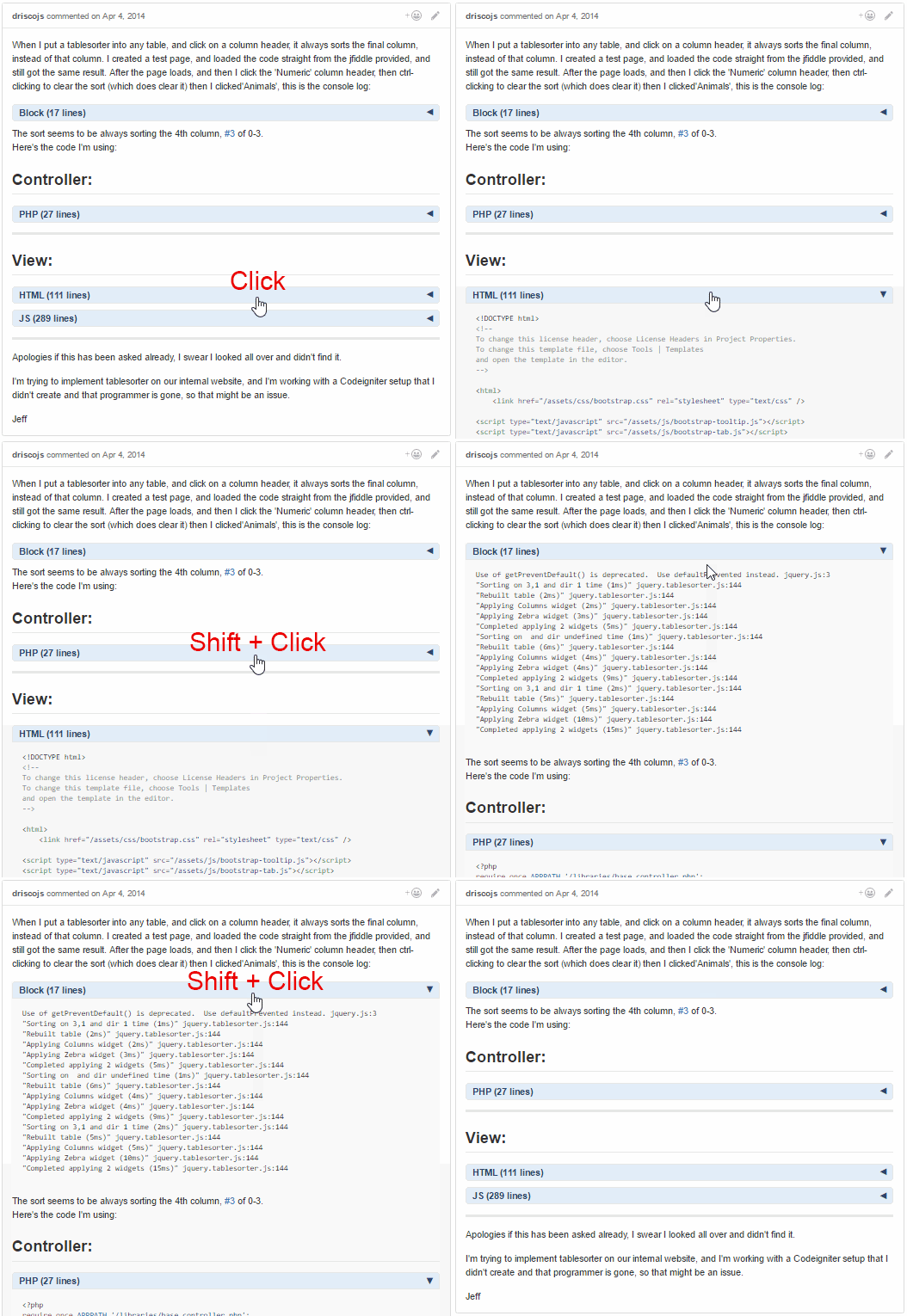
  • The block header:
    • Allows the toggling of the long code & quote block views.
    • Includes the code language based on the syntax highlighting class name; if highlighting is not applied, "Block" is used as the default name.
    • Includes the number of lines within the block.
    • Click the header to toggle the view of the content immediately below the header.
    • Use Shift + Click to toggle all the view of all blocks within the same issue comment.
  • Can be used along with the [[GitHub-collapse-markdown]] userscript.
  • Use the userscript addon to change these settings (see screenshot below):
    • "Set GitHub Collapse in Comment Max Lines" to the number of lines within a block needed to add a header (set to 10 by default).
    • "Set GitHub Collapse in Comment Initial State" to expanded to not have the blocks initially collapsed (collapsed by default).
    • After changing either option, make sure to reload the page (Shift + F5) to have the updated setting take effect.

Hosted with ♥ at GitHub