SteamDB検索をエクスポート

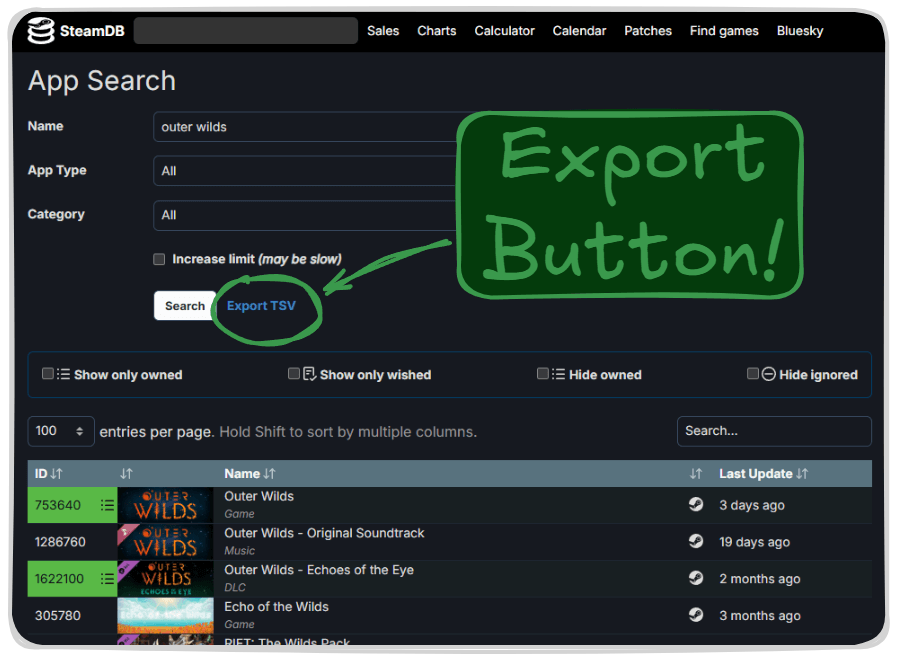
SteamDBの現在の検索をTSVとしてエクスポートするボタンを追加します

2025/01/27のページです。最新版はこちら

スクリプトをインストールするには、Tampermonkey, GreasemonkeyViolentmonkey のような拡張機能のインストールが必要です。

You will need to install an extension such as Tampermonkey to install this script.

スクリプトをインストールするには、TampermonkeyViolentmonkey のような拡張機能のインストールが必要です。

スクリプトをインストールするには、TampermonkeyUserscripts のような拡張機能のインストールが必要です。

このスクリプトをインストールするには、Tampermonkeyなどの拡張機能をインストールする必要があります。

このスクリプトをインストールするには、ユーザースクリプト管理ツールの拡張機能をインストールする必要があります。

(ユーザースクリプト管理ツールは設定済みなのでインストール!)

このスタイルをインストールするには、Stylusなどの拡張機能をインストールする必要があります。

このスタイルをインストールするには、Stylus などの拡張機能をインストールする必要があります。

このスタイルをインストールするには、Stylus tなどの拡張機能をインストールする必要があります。

このスタイルをインストールするには、ユーザースタイル管理用の拡張機能をインストールする必要があります。

このスタイルをインストールするには、ユーザースタイル管理用の拡張機能をインストールする必要があります。

このスタイルをインストールするには、ユーザースタイル管理用の拡張機能をインストールする必要があります。

(ユーザースタイル管理ツールは設定済みなのでインストール!)

作者のサイトでサポートを受ける。または、このスクリプトの質問や評価の投稿はこちら通報はこちらへお寄せください
作者
JLCareglio
評価
0 0 0
バージョン
2.3.7
作成日
2023/08/07
更新日
2025/01/27
大きさ
8.03KB
互換性
Firefox への互換性あり Chrome への互換性あり Opera への互換性あり Safari への互換性あり Edge への互換性あり
ライセンス
MIT
対象サイト

Export SteamDB Search

This script or UserScript adds a button to export current search results in SteamDB as TSV format.

image

License: MIT Tampermonkey SteamDB

Firefox Chrome Opera Safari Edge Brave

✨ Features

  • Adds "Export TSV" button next to the search filters
  • Exports detailed information of all search results in TSV format
  • Includes:
    • App ID
    • Game name
    • Last Update (UTC)
  • Compatible with multiple browsers

🚀 Installation

  1. Install Tampermonkey or other userscript manager
  2. Click here to install the script
  3. Visit SteamDB Search to try it

💡 Usage

  1. Go to SteamDB Search page
  2. Perform your search
  3. You'll find a new "Export TSV" button in the filters section
  4. Click "Export TSV" to start the export and wait
  5. The TSV file will download automatically