GitHub Code Folding

A userscript that adds code folding to GitHub files

이 스크립트를 설치하려면 Tampermonkey, Greasemonkey 또는 Violentmonkey와 같은 확장 프로그램이 필요합니다.

You will need to install an extension such as Tampermonkey to install this script.

이 스크립트를 설치하려면 Tampermonkey 또는 Violentmonkey와 같은 확장 프로그램이 필요합니다.

이 스크립트를 설치하려면 Tampermonkey 또는 Userscripts와 같은 확장 프로그램이 필요합니다.

이 스크립트를 설치하려면 Tampermonkey와 같은 확장 프로그램이 필요합니다.

이 스크립트를 설치하려면 유저 스크립트 관리자 확장 프로그램이 필요합니다.

(이미 유저 스크립트 관리자가 설치되어 있습니다. 설치를 진행합니다!)

이 스타일을 설치하려면 Stylus와 같은 확장 프로그램이 필요합니다.

이 스타일을 설치하려면 Stylus와 같은 확장 프로그램이 필요합니다.

이 스타일을 설치하려면 Stylus와 같은 확장 프로그램이 필요합니다.

이 스타일을 설치하려면 유저 스타일 관리자 확장 프로그램이 필요합니다.

이 스타일을 설치하려면 유저 스타일 관리자 확장 프로그램이 필요합니다.

이 스타일을 설치하려면 유저 스타일 관리자 확장 프로그램이 필요합니다.

(이미 유저 스타일 관리자가 설치되어 있습니다. 설치를 진행합니다!)
작성자
Mottie
일일 설치 수
1
총 설치 수
670
평점
13 0 1
버전
1.1.5
생성일
2016-12-29
갱신일
2024-02-17
크기
7.76KB
라이선스
MIT
적용 사이트

A userscript that adds code folding to GitHub files

  • This code only works on GitHub files (with line numbers), not in markdown code.
  • Works for both space and tab indentation.
  • This code was modified from the GitHub Code Folding Chrome extension by @noam3127 (MIT license).
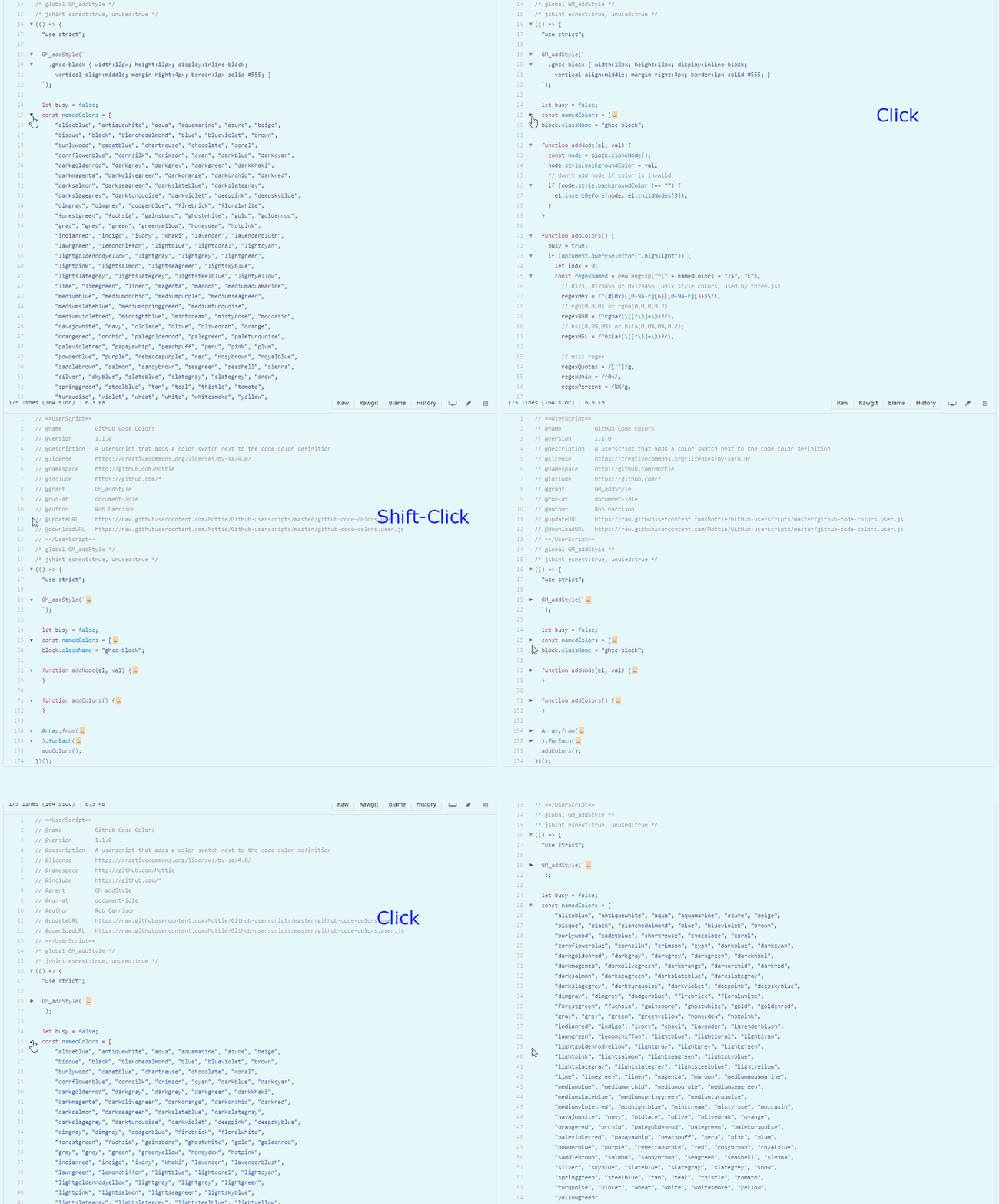
  • Clicking on an arrow will collapse a section of code with the same indentation level.
  • Using Shift click on an arrow will collapse all sections of the same code indentation level.
  • After collapsing a code block, click on either the arrow (left side) or on the ellipsis (right side), to re-expand the code block.

github-code-folding

Hosted with ♥ at GitHub