ArchTranslator

Useful tools for ArchWiki translators, now written in TypeScript.

이 스크립트를 설치하려면 Tampermonkey, Greasemonkey 또는 Violentmonkey와 같은 확장 프로그램이 필요합니다.

이 스크립트를 설치하려면 Tampermonkey와 같은 확장 프로그램을 설치해야 합니다.

이 스크립트를 설치하려면 Tampermonkey 또는 Violentmonkey와 같은 확장 프로그램이 필요합니다.

이 스크립트를 설치하려면 Tampermonkey 또는 Userscripts와 같은 확장 프로그램이 필요합니다.

이 스크립트를 설치하려면 Tampermonkey와 같은 확장 프로그램이 필요합니다.

이 스크립트를 설치하려면 유저 스크립트 관리자 확장 프로그램이 필요합니다.

(이미 유저 스크립트 관리자가 설치되어 있습니다. 설치를 진행합니다!)

이 스타일을 설치하려면 Stylus와 같은 확장 프로그램이 필요합니다.

이 스타일을 설치하려면 Stylus와 같은 확장 프로그램이 필요합니다.

이 스타일을 설치하려면 Stylus와 같은 확장 프로그램이 필요합니다.

이 스타일을 설치하려면 유저 스타일 관리자 확장 프로그램이 필요합니다.

이 스타일을 설치하려면 유저 스타일 관리자 확장 프로그램이 필요합니다.

이 스타일을 설치하려면 유저 스타일 관리자 확장 프로그램이 필요합니다.

(이미 유저 스타일 관리자가 설치되어 있습니다. 설치를 진행합니다!)

작성자
bonk-dev
일일 설치 수
0
총 설치 수
6
평점
0 0 0
버전
2.0.5
생성일
2024-05-24
갱신일
2025-03-20
크기
51.4KB
라이선스
MIT
적용 사이트

ArchTranslator

License Badge

Useful tools for ArchWiki translators, now written in TypeScript.

Usage

  • Install the UserScript
  • Change the active language (the default is Polish):

Change language tool

Build

You can build the script yourself:

Clone the repo: git clone https://github.com/bonk-dev/arch-translator.git

Remember to install the dev dependencies: npm install

Single build: npm run build

Build on change: npm run watch

The three (two usable) files will be in the build/ directory:

  • arch-translator.user.js - ready to use UserScript
  • arch-translator.srcmap.user.js - ready to use UserScript but with inlined sourcemap
  • arch-translator.js - raw output from esbuild (no UserScript header)

Features

  • Copies and pastes the original source;
  • Inserts the localized {{TranslationStatus}} template;
  • Inserts the English interlanguage link;
  • Sorts the header elements according to the ArchWiki style;
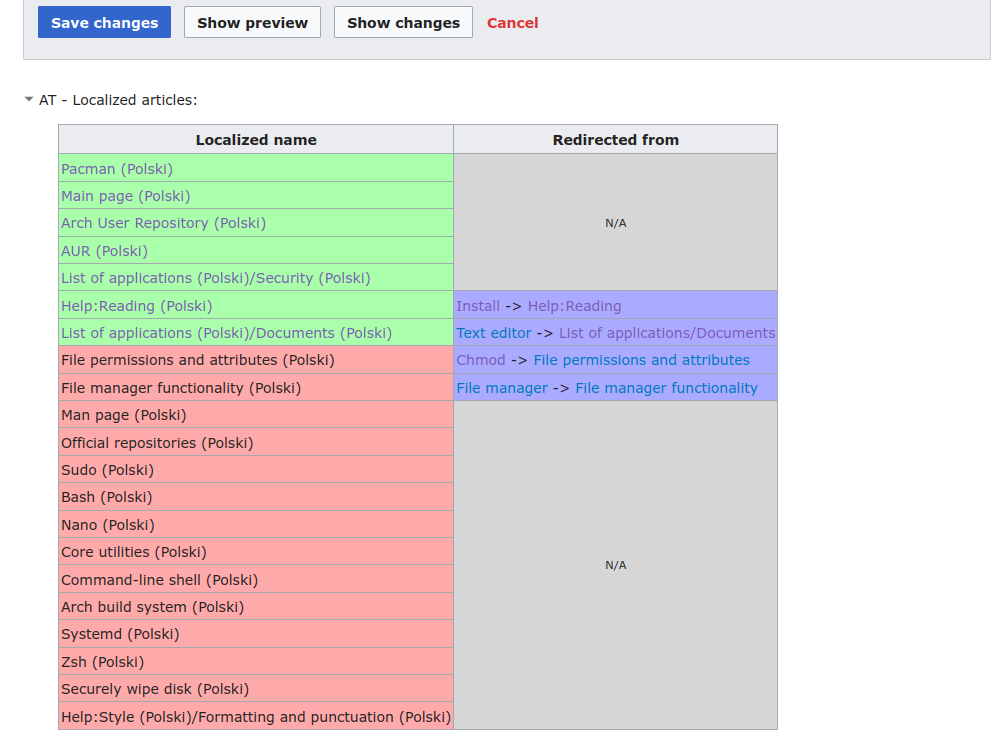
  • Scans the page content for already translated articles.

Translated articles scanner

The script scans the article for links to other articles and checks if these articles have been already translated to the language of choice.

In this example we can see that the page content contains many links to English pages. Pages highlighted in green have a translation page. Translated articles scanner UI