Find userscripts for the current website from popular script repositories
Per
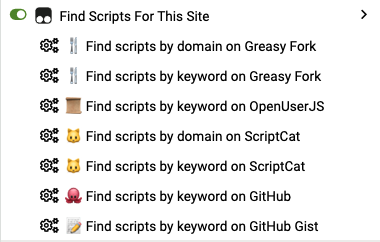
A practical userscript that helps you quickly find userscripts for the current website you're browsing, supporting multiple mainstream script repositories.
Ensure your browser has one of the following userscript managers installed:
The script automatically detects your browser language and displays the appropriate menu text. Currently supports:
GM_registerMenuCommand to register multiple search optionsGM_openInTab to open search results in a new tab| Repository | Icon | Search Methods |
|---|---|---|
| Greasy Fork | 🍴 | Domain search, Keyword search |
| OpenUserJS | 📜 | Keyword search |
| ScriptCat | 🐱 | Domain search, Keyword search |
| GitHub | 🐙 | Keyword search (JavaScript code) |
| GitHub Gist | 📝 | Keyword search (JavaScript code) |
The script provides configurable options in the CONFIG object:
const CONFIG = {
  REPOSITORIES: [
    // Repository configurations...
  ],
  DEBUG: false, // Debug mode switch
}
To view detailed operation logs, set CONFIG.DEBUG to true:
DEBUG: true,
Q: Menu items not showing?
A: Please check:
Q: Search results not accurate?
A: Possible reasons:
DEBUG: true)Issues and Pull Requests are welcome!
MIT License - See LICENSE file for details
