Overleaf Collapse All Folders

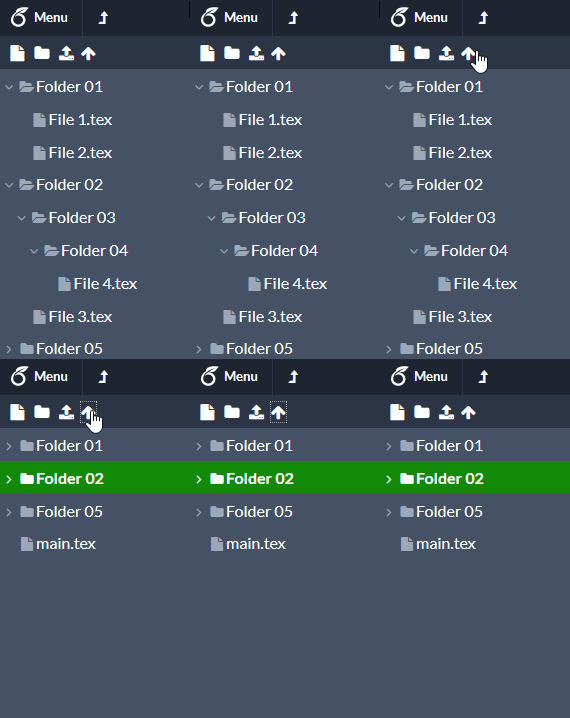
Adds a button, that when pressed, collapses all folders within the Overleaf file viewer.

You will need to install an extension such as Tampermonkey, Greasemonkey or Violentmonkey to install this script.

You will need to install an extension such as Tampermonkey to install this script.

You will need to install an extension such as Tampermonkey or Violentmonkey to install this script.

You will need to install an extension such as Tampermonkey or Userscripts to install this script.

You will need to install an extension such as Tampermonkey to install this script.

You will need to install a user script manager extension to install this script.

(I already have a user script manager, let me install it!)

You will need to install an extension such as Stylus to install this style.

You will need to install an extension such as Stylus to install this style.

You will need to install an extension such as Stylus to install this style.

You will need to install a user style manager extension to install this style.

You will need to install a user style manager extension to install this style.

You will need to install a user style manager extension to install this style.

(I already have a user style manager, let me install it!)
Autor
supercigar
Instalări zilnice
0
Total instalări
19
Rating-uri
0 0 0
Versiune
2.0
Creat
16-04-2021
Actualizat
21-04-2021
Size
2,76 KB
Licență
N/A
Se aplică pe

Overleaf Collapse All Folders

This userscript is also on GitHub!

Description

Adds a button which allows collapsing all folders within the file viewer.

Demo

demo animation of userscript