Gemini Chat Markdown Exporter (Thoughts Included)

Export the current Gemini chat to Markdown via internal batchexecute RPC (with Thoughts content when present).

Na nainštalovanie skriptu si budete musieť nainštalovať rozšírenie, ako napríklad Tampermonkey, Greasemonkey alebo Violentmonkey.

Na inštaláciu tohto skriptu je potrebné nainštalovať rozšírenie, ako napríklad Tampermonkey.

Na nainštalovanie skriptu si budete musieť nainštalovať rozšírenie, ako napríklad Tampermonkey, % alebo Violentmonkey.

Na nainštalovanie skriptu si budete musieť nainštalovať rozšírenie, ako napríklad Tampermonkey alebo Userscripts.

Na inštaláciu tohto skriptu je potrebné nainštalovať rozšírenie, ako napríklad Tampermonkey.

Na inštaláciu tohto skriptu je potrebné nainštalovať rozšírenie správcu používateľských skriptov.

(Už mám správcu používateľských skriptov, nechajte ma ho nainštalovať!)

Na inštaláciu tohto štýlu je potrebné nainštalovať rozšírenie, ako napríklad Stylus.

Na inštaláciu tohto štýlu je potrebné nainštalovať rozšírenie, ako napríklad Stylus.

Na inštaláciu tohto štýlu je potrebné nainštalovať rozšírenie, ako napríklad Stylus.

Na inštaláciu tohto štýlu je potrebné nainštalovať rozšírenie správcu používateľských štýlov.

Na inštaláciu tohto štýlu je potrebné nainštalovať rozšírenie správcu používateľských štýlov.

Na inštaláciu tohto štýlu je potrebné nainštalovať rozšírenie správcu používateľských štýlov.

(Už mám správcu používateľských štýlov, nechajte ma ho nainštalovať!)

Autor
NoahTheGinger
Denne inštalácií
0
Celkový počet inštalácií
101
Hodnotenie
2 0 1
Verzia
0.4.2
Vytvorené
16.09.2025
Aktualizované
08.10.2025
Veľkosť
19,0 KB
Licencia
MIT
Spustiť na

Gemini Chat Markdown Exporter

Export your Google Gemini conversations to clean, readable Markdown files with a single click.

Features

  • One-click export - Adds an "Export" button to the Gemini interface
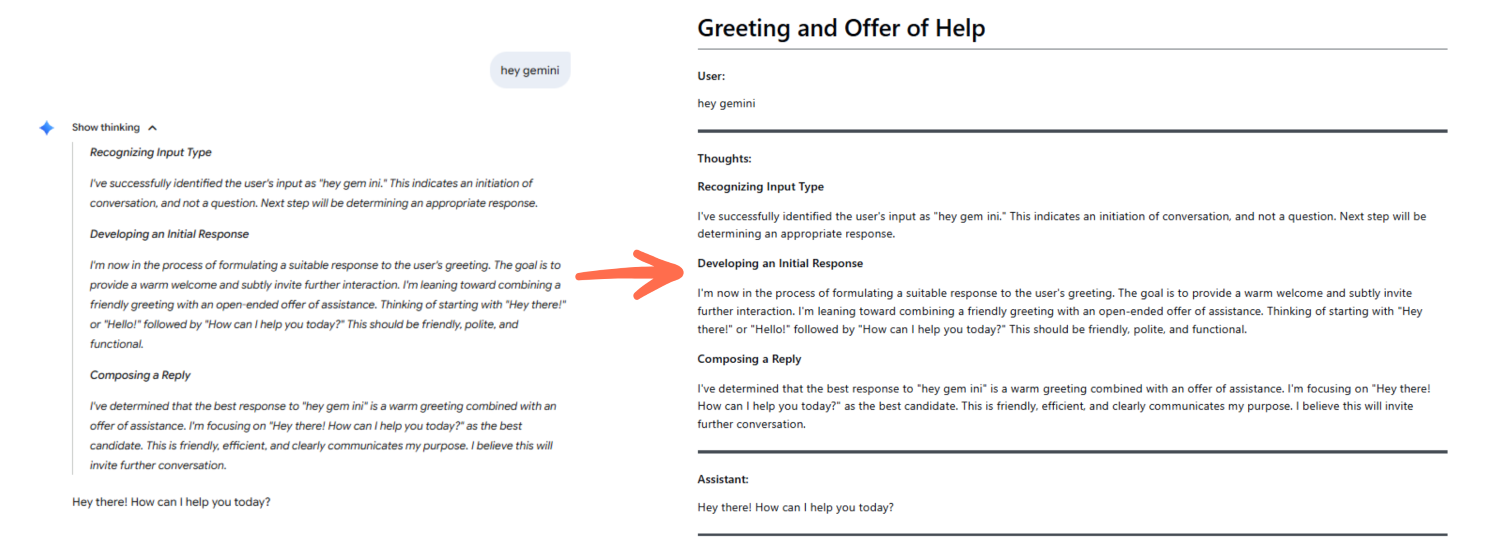
  • Preserves conversation structure - Exports User prompts, Assistant responses, and Gemini 2.5 Pro's "Thoughts" (reasoning steps)
  • Clean Markdown formatting - Well-structured output with proper headers and dividers
  • Proper conversation titles - Uses the conversation title for the filename and document header

Screenshot

Gemini Chat Export Example

Left: Original Gemini chat | Right: Exported Markdown rendered

How to Use

  1. Install the userscript via GreasyFork
  2. Navigate to any Gemini conversation at https://gemini.google.com/app/[chatId]
  3. Click the blue "Export" button in the bottom-right corner
  4. Your conversation downloads as a .md file with timestamp

Output Format

The script exports conversations with:

  • Conversation title as the main header
  • User messages, Thoughts (when present), and Assistant responses clearly labeled
  • Section dividers for improved readability
  • Filename format: [Conversation_Title]_YYYY-MM-DDTHH-MM-SS.md

Compatibility

Works with both Gemini 2.5 Flash and Gemini 2.5 Pro models. Thoughts/reasoning steps are only included when actually present (typically with 2.5 Pro).

Technical Notes

The script uses Gemini's internal batchexecute RPC to fetch conversation data directly, ensuring complete and accurate exports.