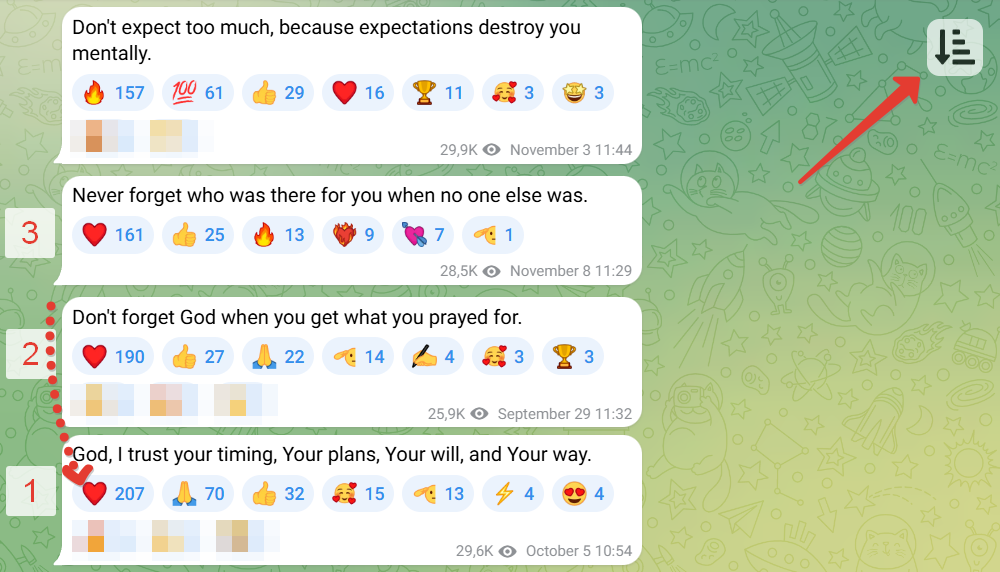
Telegram Web เรียงตามปฏิกิริยา

ช่วยคุณค้นหาข้อความ (โพสต์) ที่มีปฏิกิริยา (ถูกใจ) มากที่สุดใน Telegram

คุณจะต้องติดตั้งส่วนขยาย เช่น Tampermonkey, Greasemonkey หรือ Violentmonkey เพื่อติดตั้งสคริปต์นี้

You will need to install an extension such as Tampermonkey to install this script.

คุณจะต้องติดตั้งส่วนขยาย เช่น Tampermonkey หรือ Violentmonkey เพื่อติดตั้งสคริปต์นี้

You will need to install an extension such as Tampermonkey or Userscripts to install this script.

You will need to install an extension such as Tampermonkey to install this script.

You will need to install a user script manager extension to install this script.

(I already have a user script manager, let me install it!)

You will need to install an extension such as Stylus to install this style.

You will need to install an extension such as Stylus to install this style.

You will need to install an extension such as Stylus to install this style.

You will need to install a user style manager extension to install this style.

You will need to install a user style manager extension to install this style.

You will need to install a user style manager extension to install this style.

(I already have a user style manager, let me install it!)

ผู้เขียน
sokollondon
จำนวนติดตั้งประจำวัน
5
จำนวนติดตั้งทั้งหมด
1,259
คะแนน
3 0 0
เวอร์ชัน
0.1.6
สร้างเมื่อ
01-12-2022
อัปเดตเมื่อ
25-11-2025
Size
10.1 กิโลไบต์
สัญญาอนุญาต
ไม่มี
ปรับใช้กับ

img Language: EN, РУ

Sort by reactions. Helps you find messages (posts) with the highest number of reactions (likes) :+1:. The script adds a button to Telegram for sorting messages (up to 80 items).

Instructions

How to install and use:

On a computer (easier)

Installation

  1. Install the Tampermonkey browser extension.
  2. Then install the sorting script (green button). Or add the code manually.

Usage

  1. Open any channel or group at https://web.telegram.org/a/
  2. Press the Page Up button several times to load more messages. Or use the mouse wheel. But do not use the Home button, as not all messages will have time to load.
  3. Click the new button to sort. All messages will be sorted by the number of reactions.

If problems occur — refresh the page.


On mobile devices

Installation

  1. Install the Lemur Browser (needed because not all mobile browsers allow installing extensions)
  2. Install the Tampermonkey extension in it.
  3. Enable developer mode in the browser: open the extensions page chrome://extensions/ and activate the "Developer mode" toggle at the top.
  4. Then install the sorting script (green button)

Usage

  1. Open any channel or group at https://web.telegram.org/a/
  2. Scroll to load more messages.
  3. Click the new button to sort. All messages will be sorted by the number of reactions.

If problems occur — refresh the page.