Jira copy summary

Adds a "Copy summary" button for issue pages on Jira.

Bu betiği kurabilmeniz için Tampermonkey, Greasemonkey ya da Violentmonkey gibi bir kullanıcı betiği eklentisini kurmanız gerekmektedir.

Bu betiği yüklemek için Tampermonkey gibi bir uzantı yüklemeniz gerekir.

Bu betiği kurabilmeniz için Tampermonkey ya da Violentmonkey gibi bir kullanıcı betiği eklentisini kurmanız gerekmektedir.

Bu betiği kurabilmeniz için Tampermonkey ya da Userscripts gibi bir kullanıcı betiği eklentisini kurmanız gerekmektedir.

Bu betiği indirebilmeniz için ayrıca Tampermonkey gibi bir eklenti kurmanız gerekmektedir.

Bu komut dosyasını yüklemek için bir kullanıcı komut dosyası yöneticisi uzantısı yüklemeniz gerekecek.

(Zaten bir kullanıcı komut dosyası yöneticim var, kurmama izin verin!)

Bu stili yüklemek için Stylus gibi bir uzantı yüklemeniz gerekir.

Bu stili yüklemek için Stylus gibi bir uzantı kurmanız gerekir.

Bu stili yükleyebilmek için Stylus gibi bir uzantı yüklemeniz gerekir.

Bu stili yüklemek için bir kullanıcı stili yöneticisi uzantısı yüklemeniz gerekir.

Bu stili yüklemek için bir kullanıcı stili yöneticisi uzantısı kurmanız gerekir.

Bu stili yükleyebilmek için bir kullanıcı stili yöneticisi uzantısı yüklemeniz gerekir.

(Zateb bir user-style yöneticim var, yükleyeyim!)

Yazar
andrybak ve dtruebin
Günlük kurulumlar
0
Toplam kurulumlar
24
Değerlendirmeler
0 0 0
Versiyon
5.3
Oluşturulma
21.09.2023
Güncellenme
07.05.2026
Boyut
8,59 KB
Lisans
MIT
Geçerli

This user script adds a "Copy summary" button for issue pages on Jira. The rich text (HTML) summary, which is great for pasting in Confluence and in Slack looks like this:

[MC-179867] Unicode Characters swapped in Minecraft

The plain text version looks like this:

[MC-179867] Unicode Characters swapped in Minecraft

The button to copy the summary is added to the regular menu of buttons:

demonstration of the button

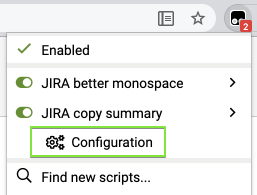
When on a Jira page, the script can be configured using the corresponding extension menu item (screenshot from Tampermonkey):
The script supports only Jira Server (self-hosted).

Instructions

The script uses @include rules to work on any domain that includes the word jira. If your browser doesn't support @include (which might happen in the future when Chrome switches to Manifest V3 browser extensions) or your Bitbucket Server uses a domain which doesn't include the word jira, you'll have to manually add your domain. Up-to-date instructions are at https://github.com/rybak/atlassian-tweaks#custom-domains

Source code

Source code and full history can be seen on GitHub: https://github.com/rybak/atlassian-tweaks/blob/main/jira_copy_summary.user.js

See also

More user scripts and user styles for Confluence, Jira, and Bitbucket in set Atlassian Tweaks.