🎧 YouTube Audio Enhancer Pro V7.3

Professional Audio Enhancer: Dolby Atmos, 3D Surround, & Bass Boost.

You will need to install an extension such as Tampermonkey, Greasemonkey or Violentmonkey to install this script.

You will need to install an extension such as Tampermonkey to install this script.

You will need to install an extension such as Tampermonkey or Violentmonkey to install this script.

You will need to install an extension such as Tampermonkey or Userscripts to install this script.

You will need to install an extension such as Tampermonkey to install this script.

You will need to install a user script manager extension to install this script.

(I already have a user script manager, let me install it!)

You will need to install an extension such as Stylus to install this style.

You will need to install an extension such as Stylus to install this style.

You will need to install an extension such as Stylus to install this style.

You will need to install a user style manager extension to install this style.

You will need to install a user style manager extension to install this style.

You will need to install a user style manager extension to install this style.

(I already have a user style manager, let me install it!)

ئاپتورى
Moryata
بۈگۈن قاچىلانغىنى
2
جەمئىي قاچىلانغىنى
30
باھا نومۇرى
1 0 0
نەشرى
7.3
قۇرۇلغان ۋاقتى
2025-11-20
يېڭىلانغان ۋاقتى
2025-11-20
Size
17.1 KB
ئىجازەتنامىسى
MIT
قوللايدىغىنى

🎧 YouTube Audio Enhancer Pro V7.3

The Ultimate Audio Experience for YouTube

Transform your YouTube listening experience with a professional-grade audio engine directly in your browser. This script adds a sleek, draggable Glassmorphism panel that gives you full control over your audio routing, simulating Dolby Atmos and Cinema Surround Sound.
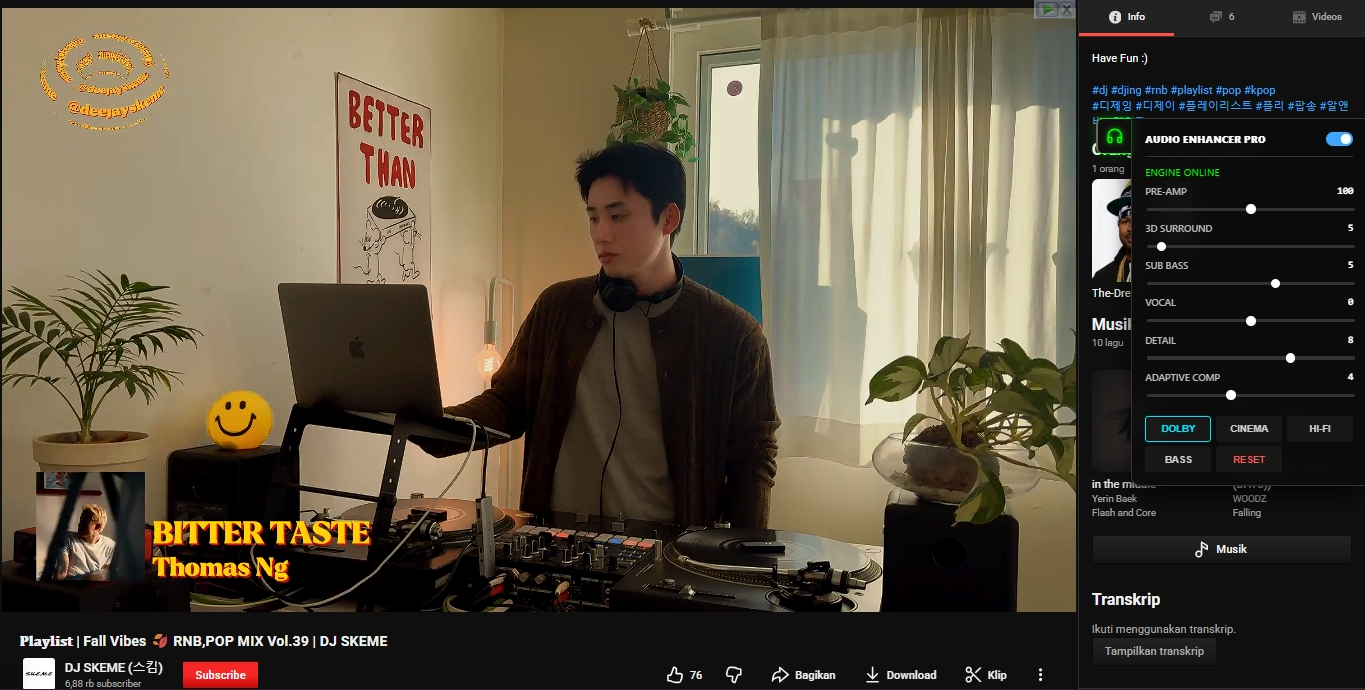
Audio Enhancer UI


🔥 Key Features (V7.3 Update)

  • 🚀 Dolby Atmos Simulation: Dedicated preset that widens the soundstage and enhances dynamic range for a theater-like experience.
  • 🔊 3D Surround Sound: New slider logic that manipulates stereo separation and reverb tail (compressor release) to create immersive spatial audio.
  • 💾 Auto-Save Settings: Your settings (Volume, EQ, Position) are now saved automatically. Reload the page, and your perfect sound is still there.
  • 💎 Glassmorphism UI: A beautiful, semi-transparent interface that blurs the background. It looks native and modern.
  • 🧩 Adaptive Compressor: "Clarity" slider intelligently adjusts threshold and ratio to ensure quiet dialogue is heard without distorting loud explosions.
  • 🔧 Fixed & Stable: Solved menu dragging issues and click conflicts. Works with YouTube's single-page navigation (no refresh needed).

🎛️ Presets Included:

  1. DOLBY: High dynamic range, wide soundstage, deep bass (Perfect for Movies/Trailers).
  2. CINEMA: Balanced surround sound for casual viewing.
  3. HI-FI: Pure stereo focus, minimal coloring (Perfect for Music).
  4. BASS: Aggressive low-end boost for EDM/Trap.

🛠️ How to Use:

  1. Install the script.
  2. Open any YouTube video.
  3. Click the Headphone Icon (🎧) on the right side of the screen.
  4. Drag the icon to move it anywhere. Click it to open the panel.
  5. Select a preset like DOLBY or adjust the 3D SURROUND slider manually.
  6. Enjoy!

Made with ❤️ by Moryata