Trợ lý nhảy nhanh kho GitHub

🤠 Trợ lý nhảy nhanh kho GitHub, được thiết kế đặc biệt để giúp người dùng truy cập nhanh vào kho của họ trên GitHub. Nó tạo ra một nút ở đầu thanh điều hướng. Nhấp để mở rộng tất cả các kho lưu trữ của bạn và dễ dàng chuyển đến trang kho lưu trữ GitHub của riêng bạn mà không cần sử dụng menu phụ của GitHub.

Tính đến 01-11-2024. Xem phiên bản mới nhất.

You will need to install an extension such as Tampermonkey, Greasemonkey or Violentmonkey to install this script.

You will need to install an extension such as Tampermonkey to install this script.

You will need to install an extension such as Tampermonkey or Violentmonkey to install this script.

You will need to install an extension such as Tampermonkey or Userscripts to install this script.

You will need to install an extension such as Tampermonkey to install this script.

You will need to install a user script manager extension to install this script.

(Tôi đã có Trình quản lý tập lệnh người dùng, hãy cài đặt nó!)

You will need to install an extension such as Stylus to install this style.

You will need to install an extension such as Stylus to install this style.

You will need to install an extension such as Stylus to install this style.

You will need to install a user style manager extension to install this style.

You will need to install a user style manager extension to install this style.

You will need to install a user style manager extension to install this style.

(I already have a user style manager, let me install it!)

Tác giả
人民的勤务员
Đánh giá
0 0 0
Phiên bản
2024.11.1.19
Đã tạo
01-11-2024
Đã cập nhật
01-11-2024
Kích thước
60 KB
Giấy phép
MIT
Áp dụng cho

GitHub 快速跳转助手

功能简介

GitHub 快速跳转助手是一款专为帮助用户快速访问自己在 GitHub 上的仓库而设计。它可以大幅提高开发者在使用 GitHub 时的效率。
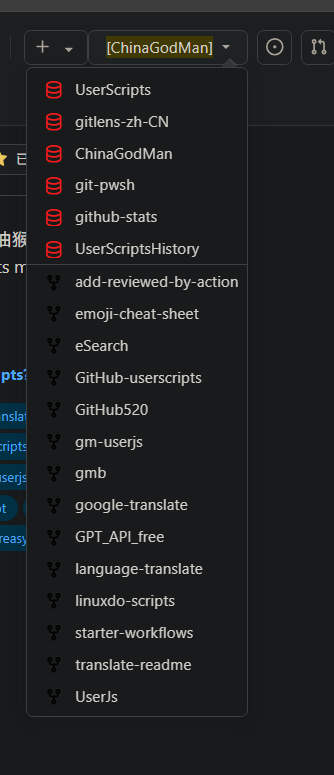
主要功能

  1. 快速跳转按钮:在 GitHub 的页面上添加一个方便的按钮,让用户一键跳转到自己的所有仓库。
  2. 自定义仓库列表:自动获取并显示用户的仓库列表,支持筛选和排序,用户可以快速找到目标仓库。
  3. 易于使用:简单的用户界面,方便用户快速上手,无需复杂配置。
  4. 在移动设备上可用:适配移动设备,让用户在手机上也能轻松访问自己的仓库。(需要点击左上角的小猫咪图标)

使用说明

  1. 安装 Tampermonkey 或其他用户脚本管理器。
  2. 点击上方的 "安装" 按钮,将脚本添加到你的浏览器中。
  3. 在 GitHub 页面上点击新增的快速跳转按钮,即可查看自己的仓库列表并快速访问。

注意事项

  • 如需访问私人仓库,请添加自己的 GitHub Token 到脚本设置中。
  • 请确保在 GitHub 上有足够的权限来访问自己的仓库。
  • 脚本适用于所有常见浏览器,但在不同设备上可能会有些许差异。

Snipaste_2024-11-01_19-50-13.png