GitHub Commit Labels

Enhances GitHub commits with beautiful labels for conventional commit types (feat, fix, docs, etc.)

目前為 2025-04-12 提交的版本,檢視 最新版本

您需要先安裝使用者腳本管理器擴展,如 TampermonkeyGreasemonkeyViolentmonkey 之後才能安裝該腳本。

You will need to install an extension such as Tampermonkey to install this script.

您需要先安裝使用者腳本管理器擴充功能,如 TampermonkeyViolentmonkey 後才能安裝該腳本。

您需要先安裝使用者腳本管理器擴充功能,如 TampermonkeyUserscripts 後才能安裝該腳本。

你需要先安裝一款使用者腳本管理器擴展,比如 Tampermonkey,才能安裝此腳本

您需要先安裝使用者腳本管理器擴充功能後才能安裝該腳本。

(我已經安裝了使用者腳本管理器,讓我安裝!)

你需要先安裝一款使用者樣式管理器擴展,比如 Stylus,才能安裝此樣式

你需要先安裝一款使用者樣式管理器擴展,比如 Stylus,才能安裝此樣式

你需要先安裝一款使用者樣式管理器擴展,比如 Stylus,才能安裝此樣式

你需要先安裝一款使用者樣式管理器擴展後才能安裝此樣式

你需要先安裝一款使用者樣式管理器擴展後才能安裝此樣式

你需要先安裝一款使用者樣式管理器擴展後才能安裝此樣式

(我已經安裝了使用者樣式管理器,讓我安裝!)

作者
nazdridoy
評價
0 0 0
版本
1.4.0
建立日期
2025-02-07
更新日期
2025-04-12
尺寸
65.7 KB
授權條款
MIT
腳本執行於

GitHub Commit Labels

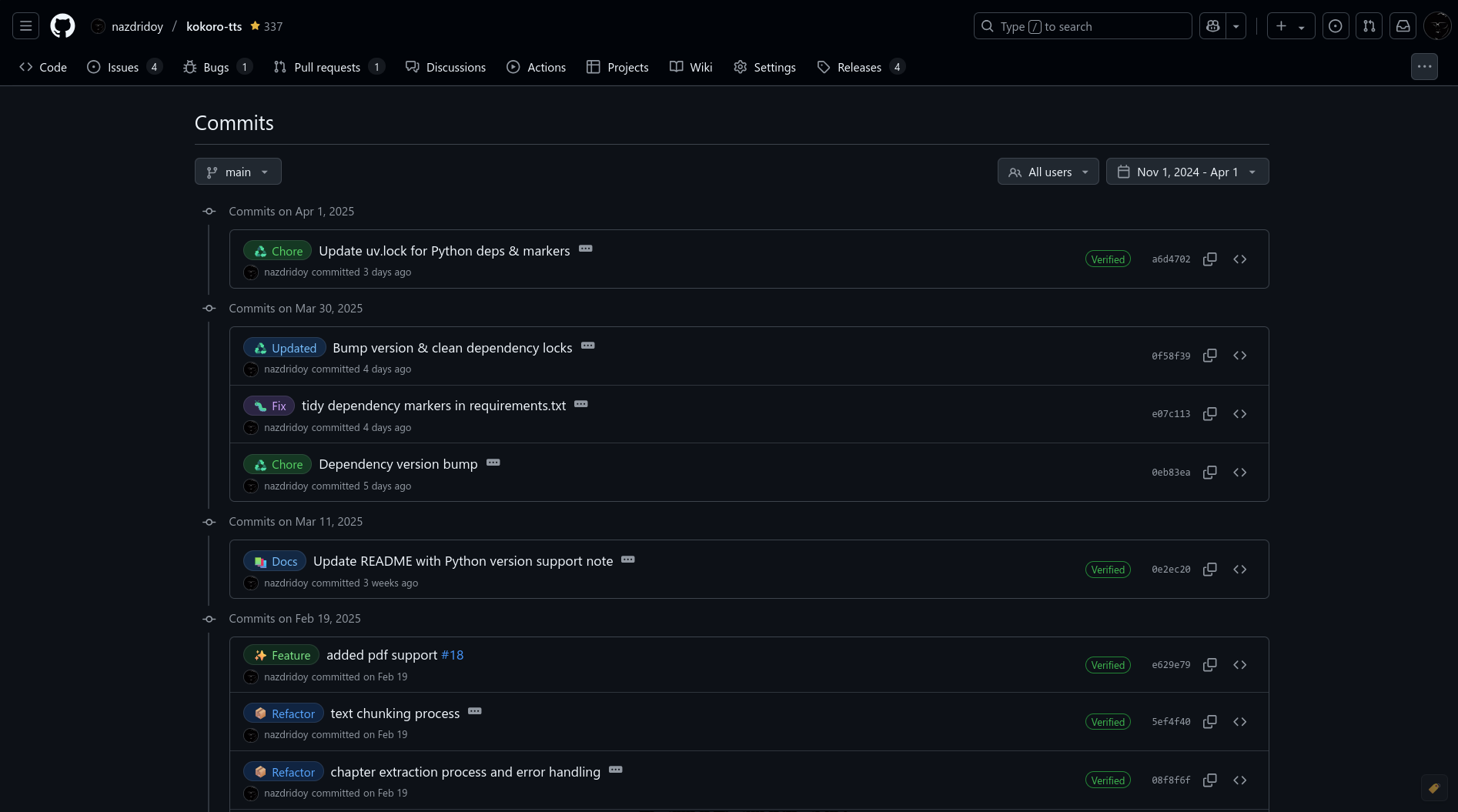
A userscript that enhances GitHub commits by adding beautiful labels for conventional commit types. It automatically detects commit types (like feat, fix, docs) and adds visually appealing labels to make your commit history more readable.
Features

  • 🏷️ Adds beautiful labels to conventional commit messages
  • 🎨 GitHub-style design that matches the platform
  • 🌓 Automatic theme detection (light, dark, and dark dimmed)
  • 💬 Informative tooltips showing detailed descriptions
  • 👆 Toggle button to quickly show/hide labels
  • 📤 Export/Import configurations for team sharing
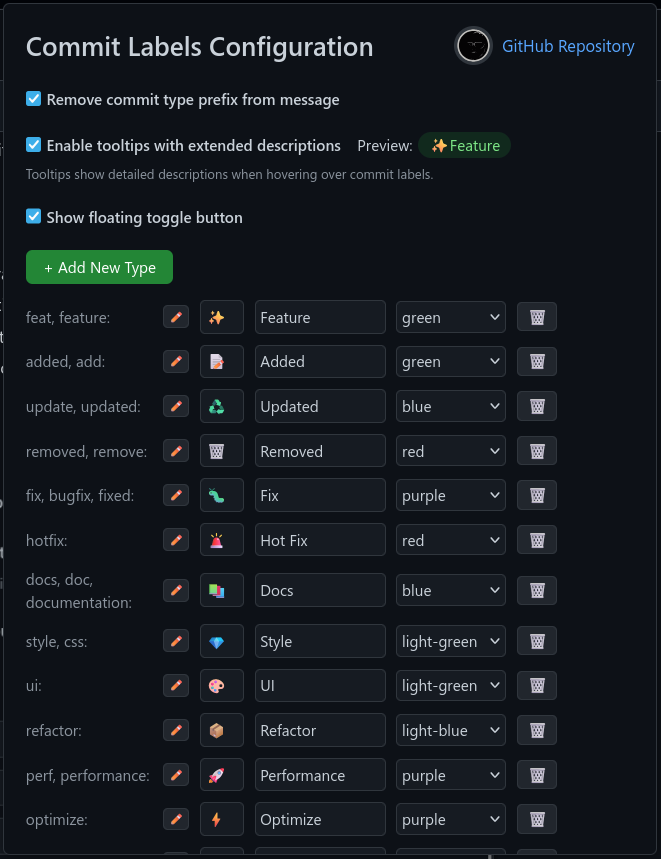
  • ⚙️ Fully customizable through a user-friendly configuration panel
  • 🔄 Supports multiple aliases for each commit type
  • 🎯 Works on commit history and single commit pages

preview1

Supported Commit Types

Default commit types and their aliases:

  • Feature: feat, feature
  • Added: added, add
  • Updated: update, updated
  • Removed: removed, remove
  • Fix: fix, bugfix, fixed
  • Hot Fix: hotfix
  • Documentation: docs, doc, documentation
  • Style: style, css
  • UI: ui
  • Refactor: refactor
  • Performance: perf, performance
  • Optimize: optimize
  • Test: test, tests, testing
  • Build: build
  • CI/CD: ci, cd
  • Deploy: deploy, release
  • Dependencies: deps, dep, dependencies
  • Chore: chore
  • Revert: revert
  • WIP: wip
  • Security: security
  • Internationalization: i18n
  • Accessibility: a11y
  • API: api
  • Database: data
  • Configuration: config
  • Initial Setup: init
  • You Can ADD More

Installation

  1. Install a userscript manager:

  2. Install the script:

    • Install from Greasy Fork
    • Or create a new script in your userscript manager and copy the contents of github-commit-labels.js

Configuration

  1. Click on your userscript manager's icon
  2. Select "GitHub Commit Labels" > "Configure Commit Labels"
  3. Customize:
    • Add/remove commit types
    • Edit aliases
    • Change emojis
    • Modify colors
    • Toggle prefix removal
    • Enable/disable tooltips
    • Show/hide floating toggle button
    • Export/Import your configuration

preview2

Development

To contribute or modify the script:

  1. Clone the repository:

    git clone https://github.com/nazdridoy/github-commit-labels.git
    
  2. Make your changes to github-commit-labels.js

  3. Test the script by loading it in your userscript manager

  4. Submit a pull request with your changes

License

MIT License - see LICENSE for details

Credits

Created by nazdridoy

Support

If you encounter any issues or have suggestions: